|
iArtComputerAnimation Workshop Steps Unit 7 |
|
week 7: Intro to Materials & Mapping
|
Workshop Activity
Intro to Materials using Max
Today, based on what you have seen in class on materials techniques, you will get a good intensive but step by step introduction to the material editor and texturing tools in 3DS MAX. Feel free to skip around and learn what you need.
Instructions
Today
we will use the 3ds Max tutorial and proceed through almost all the
steps of Tutorial 4: Intro to Materials & Mapping.
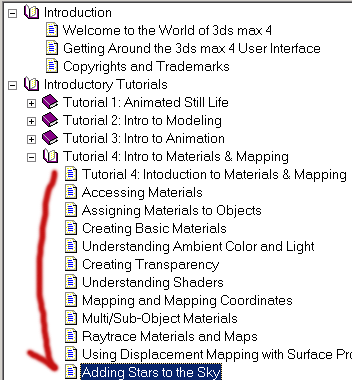
See the red area in the image below. Feel free to skip around and learn
what you need. This image corresponds with the tutorial nav bar. To
access it, bring up from the Help menu in MAX, the Introductory
Tutorials\Intro to Materials & Mapping section.
Feel free to use your own models and textures. Note
there are a lot more textures and materials on the \\storage\3dsmax
area.
3ds
MAX tutorials and resources.
We have put the tutorial CD-ROM on a student server for you to use.
Whenever max calls for tutorial files, this is where you access them.
You access the tutorial disk by mounting \\storage\3dsmax. Best
to "map" this to your workstation, so MAX, or other apps,
can see it correctly. To map a drive, in Explorer, go to "Tools",
"map network drive". Then map \\storage\3dsmax to a drive
letter like "Z".