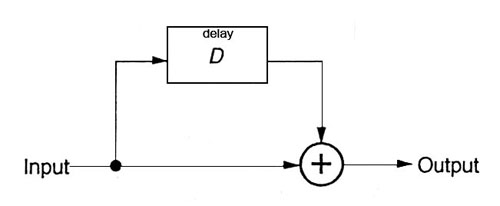
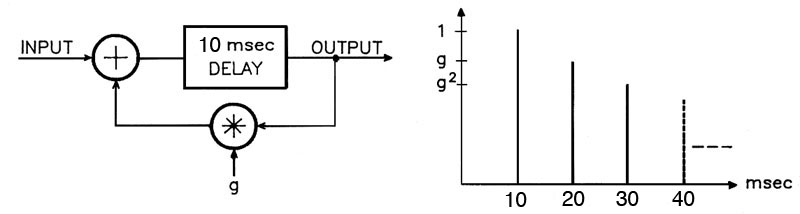
In this diagram, we keep the delay in the
phasing range of 10 ms, and identify the feedback gain
as g. For all values of g below 1
(expressed with a decimal such as .8 or as the equivalent
percentage, in this case 80%) the repetitions in the
output will fall off either very rapidly, for instance,
with a gain less than 60%, or very slowly with a gain
above 90%. In other words, the decay time is
exponentially dependent on the gain. In systems
theory this is called “negative feedback” which
paradoxically has the positive outcome of keeping the
system stable.
For instance, as noted in the output diagram with the gain
values of g, g2 etc, if the gain is 50%, the
repetitions will fall off as .5, .25, .125, ... and
approach zero very quickly. However, with 90%, they will
fall off as .9, .81, .73, .65, … which is much slower.
A gain factor above 1.0 is called “positive feedback”
which means the repetitions grow exponentially
like inflation, and in the case of audio, will go into
signal saturation (i.e. distortion) fairly quickly
depending on the speed of the repetition delay and the
gain factor. In digital software, it is common to find the
gain factor hard limited to a maximum of 99% (.99) to
avoid this kind of problem.
The analog tradition was more free-wheeling in that it
allowed momentary instances of positive gain to allow a
rapid buildup, likely followed by a decrease below 1 to
avoid saturation and distortion. Digital designers, with
some notable exceptions noted below, are more protective
of their consumers!
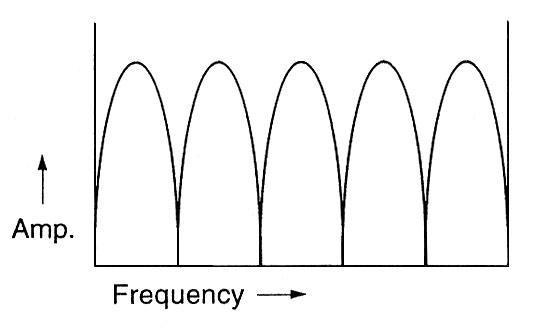
What is the most remarkable about
adding feedback to the circuit is that the frequency
response essentially becomes its opposite, as can
be seen below where the top diagram is the single delay
phasing effect, and the bottom diagram is where feedback
is added:
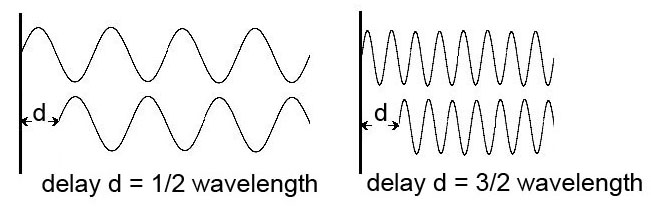
- the narrow notches at the 1/2
wavelength intervals (A, B, C) become broad
regions of attenuation according to the set of odd
harmonic frequencies, 1, 3, 5, ....
- the broad regions of amplification in between
become quite narrow peaks (a, b, c) , spaced
according to the set of even harmonic
frequencies, 2, 4, 6, ....

Comb filter frequency response without feedback (top)
and with feedback (bottom)
In terms of perception, the “hollow” impression of the
missing frequencies with phasing, becomes potentially very
strong regions of harmonically related spectral
pitches (also known as repetition pitches).
Unsurprisingly, this addition of boosted harmonics to even
a noise spectrum has proved popular with sound designers
and software developers to the extent that in a comb
filter app, this is what you’ll mainly get, but with
typically little information as to why it works.
Historical
interlude. It was easy to find
environmental examples of the comb filter effect with
broad-band moving sounds and a strong reflective surface
or building nearby. But can you think of any purely acoustic
situation that could produce a harmonic pitch impression
that was the result of multiple and equal
reflections? Clearly this is easy to produce
electronically, but acoustically? Answer here, and it’s very
intriguing!
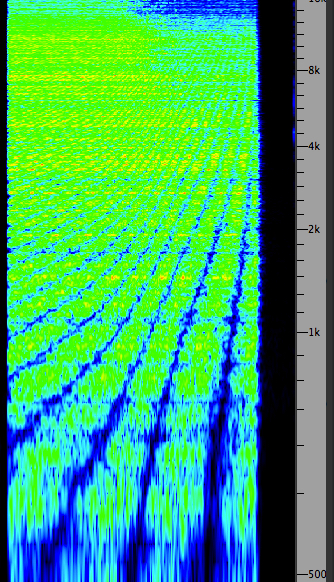
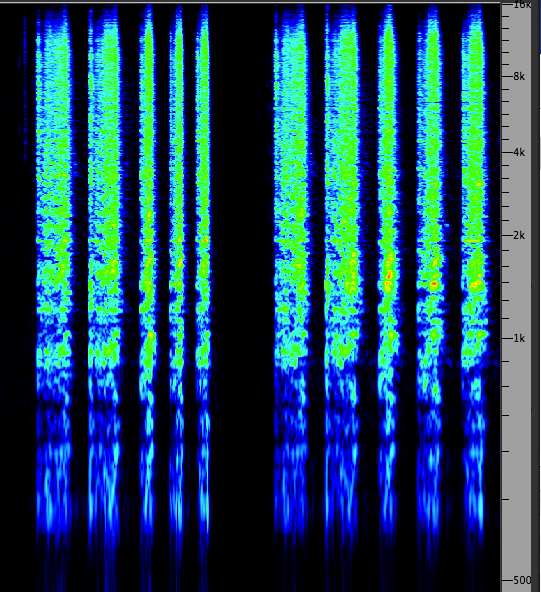
Examples. In the first sound example
below, we hear three sequences: (1) the original sound of
carding wool, which is broadband; (2) a version with
phasing created with about a 1 ms delay and no feedback;
(3) the same with feedback. The corresponding spectra are
shown at the right, with the characteristic striation
in the second example, and the boosted regions in the
third, which do sound about an octave higher.
Carding wool, original, without and
with feedback
Source: WSP Can 33 take 1& 2
|

(Click to enlarge)
|
Delays correlated with amplitude,
without and with feedback
|
(Click to enlarge)
|
In the second sound example above, we hear the phasing
examples again, without and with feedback, where the time
delays are correlated with the amplitude of the signal,
a type of effect seldom offered in plug-ins today. These
examples were realized with a Lexicon Digital Delay in
hardware that will be illustrated below. The correlation
is that higher amplitudes are correlated with shorter
delays, hence the sense of rising spectral pitch. Given
that the amplitude also correlated with the manual effort
producing the sound, this example (while abstracted) does
integrate the processing with the actual sound.
This kind of processed delays could be
called a modulation of the delays, but in the more
general case of delay modulation, there is a periodic
repetition of the delay changes typically controlled by a
subaudio oscillator, where the frequency, depth and
waveform of the modulation will be the control variables,
as illustrated below.
Unfortunately, delay modulation of this type is
often referred to as chorusing, as it sort of
blurs the resulting pitch (or makes it seem very
mechanical like a bad vibrato), and should not be confused
with the acoustic choral effect
created by multiple sound sources that are slightly detuned
and staggered in their onset, thereby adding volume
(and blend) to the perceived sound (similar to a musical
ensemble).
Index
C. Sources of time delays. Although
acoustically delayed sound in the form of reflections is
ubiquitous, in the early part of the 20th century it
proved difficult to create them electrically. The intent
was to produce artificial reverberation, but that depended
on having multiple delays. The basic problem, both for
audio and then the emerging development of computers, was
the lack of memory, particularly of the read-write
variety. How to store signals and be able, preferably in
real time, to retrieve them?
The history of both the analog and digital developments is
indeed fascinating but beyond our scope, so let’s go to
the two standard methods that emerged for audio. In the
analog domain, the separation of the recording head from
the playback head in tape
recording was the critical development. It
also improved the performance of each process if they were
separate heads, even though the less expensive machines
for home use generally continued to keep them as one unit
(since what was mainly involved was to switch the
direction of the magnetic process, to imprint the signal
or to extract it).
The three-head tape recorder (which included an erase
head prior to the record and playback heads) meant there
was a physical distance between the record head (R) and
the playback head (P) as shown in the following diagrams.
If this was on average 2 inches or 5 cm, and the standard
playback speeds were 7.5 ips (inches/sec) or 19 cm/sec,
then the delay between the recording and the playback
would be around 1/4 second. The professional speed of 15
ips (or 38 cm/sec) would result in approximately a 1/8
second delay. These values were definitely in the range of
an echo for 1/4 sec, and almost approaching the range of
reverberation for 1/8 sec, despite it being a single
repetition.
In the analog recording studio there
emerged a standard set of circuits for exploiting this
phenomenon with stereo recorders, which can be
divided into mono and stereo versions of the circuit (i.e.
one or two inputs, marked A and B below), with three
possible types of processes:
A. simple echo, i.e. a single
repetition;
B. feedback of the signal back into the recording
head with usually an external gain control through a
mixer to control feedback levels of the multiple
repetitions;
C. echo plus feedback, which is a combination of
the other two, with the delayed echo being fed back to
the opposite channel of the recording, producing a “ping
pong” left to right to left kind of feedback.

In mono echo, the sound is recorded
on the left channel and a fraction of a second later is
reproduced with a corresponding delay that is sent to
the right channel where it too is recorded, thereby
producing an echo. When a mixer was involved, the
strength of the echo could be controlled, but otherwise
it would implicitly controlled by the playback and
record levels.
In mono feedback, the delayed playback signal
was fed back into the same channel (in this case A).
With a studio mixer this was simply a matter of
controlling the playback level and sending it back to
the recorder. If a mixer wasn’t used, there were
connectors that combined (not mixed, because no levels
were involved) the two signals and you took your chances
on feedback levels unless there was a playback level
control.
In echo plus feedback, both connections are
combined except that the left channel playback is
connected to the right channel, and the right channel
playback is connected back to the left channel,
producing a very attractive pseudo-stereo effect and the
characteristic left-right-left multiple echoes. Note
that the delay for the feedback is twice that of
the echo, as there are now two delays before the
feedback loop is completed. Needless to say, this was a
very popular technique that is often imitated in digital
apps.

In the stereo vision of these circuits (i.e.
with two inputs) there is an interesting anomaly with
what might be regarded as the simplest circuit, the stereo
echo (with a single repetition). It can’t be done
with a single machine (and is sometimes still tricky to
do in the digital domain). If you were to connect the
delayed playback from either channel to the opposite, it
would produce feedback, and not a single echo. Therefore
it had to be done using two machines where the second
one was used to record the result.
Stereo feedback is a simple extension of the mono
version, where each playback stays on its own channel,
and the stereo echo plus feedback, although it
looks a bit complex, is simply routing the delayed
playback signals to the opposite channel for recording
(on a mixer this would be simply reversing the pan knobs
so that the signal went to the opposite channel). Like
its mono counterpart, this circuit and effect was very
popular because of the pseudo-stereo effect.
Footstep
sequence with multiple stereo delays, from Barry
Truax's Soundscape Study (1974)
Source: WSP Can 49, take 8
In this
analog studio use of stereo delays, the source is a
beautifully recorded sequence of a person walking across a
covered bridge in New Brunswick. The microphone is in the
middle, and so there is a very strong left to right
spatial movement created with the footsteps. Instead of
the echo just following the person’s steps, the channels
are reversed so that the illusion is of a second
person walking right to left. To add a more dramatic
element, the echo only starts in the middle where
the steps are closest to the microphone. So, we are
presented with the illusion that one person approaches,
and two people depart!
On the second pass, the footsteps are now echoed right
from the start, and then doubled again in the middle. This
happens over several passes, with the echo density getting
increasingly dense. The original delay syncopated the
rhythm (the footsteps occur at about .5 sec intervals and
the delay is .33 sec, making it a 2/3 1/3 triple rhythm),
so as a result the echoes quickly fill in the silences
between the steps. The exercise was designed to reflect
Murray Schafer’s comment about environmental rhythms
speeding up from footsteps to galloping horses to trains
and eventually flatline sounds.
The long and the short of it.
The main limitation of these circuits was the fixed
delay between the record and playback heads, with
only the available tape speeds to choose from
(usually there were only two or three speed options). One
limited variation existed in the form of recording to a tape
loop (i.e. a piece of tape where its end is
spliced to its beginning) only for the purposes of
recording a delay. To keep some tension on the loop
during playback, it usually was hung vertically with a
small tape reel to keep it taut. If the tape recorder had
a variable speed function, then the delay could be
adjusted by varying the speed of the tape. This practice
became mirrored in the digital domain by a “looping
memory” concept called a delay line which will be
illustrated below.
In order to create very long delays, particularly
with feedback, and very short delays for phasing,
considerable ingenuity had to be used. The solution for
long delays has already been hinted at with the stereo
echo. In the above diagram the connection between the two
machines is purely electrical. But there is also a physical
distance between the machines that could be varied, or
else the path of the tape could be creatively wound around
a separate stand, such that the tape would travel from the
first machine via a possibly lengthy detour and be played
back (only) many seconds later on the second machine, as
shown here.

This circuit called delayed feedback, which
always had a large “fun quotient” attached to it in the
analog studio, involved an interesting type of
performability. Now that the feedback loop was many
seconds long, it took awhile for the feedback signal to
enter the mix, and an even longer time for the feedback
levels to stabilize to an overall sound texture.
However, like all feedback circuits with their
exponential behaviour, small changes in feedback
level resulted in significant changes in the
behaviour of the circuit, except that in this case it
took a much longer time for the result to be heard.
One practical advantage of any feedback circuit in the
analog studio was that a small EQ (e.g. rolling off the
high frequencies that might build up through tape hiss)
only needed a small amount of attenuation because it
would be repeatedly applied with every feedback
loop, and likewise a presence boost in the 1-4 kHz
region could be used to counteract the inevitable
degradation of the analog re-recording process. In some
cases, a more daring or conceptually oriented user would
only use tape hiss as the sole source material, perhaps
to confirm that the medium is not only the message but
its content as well!
A fascinating variation of the long delay feedback
circuit was to perform the entire process with
reversed sound (i.e. playing the source sound in
the backwards direction). Given that analog feedback
went from copies of the original to a denser and
possibly more degraded form, this allowed the trajectory
of the sound to be in the opposite direction: starting
in a dense, degraded form and gradually transitioning
back to the less dense original. The trick was to
perform the feedback levels while hearing the sounds in
their backwards direction. Then, the process was
stopped, and the recorded tape reversed and only then
could you hear what the forwards version of the material
sounded like!
Delayed feedback sequence with an ax hit, footsteps
and closing door, from Barry Truax's Soundscape
Study (1974)
Source: WSP Can 85, take 7
Lastly, how could the extremely
small time delays involved in phasing (i.e. less
than 10 ms) be achieved with analog recorders? Here’s a
hint: unlike digital recorders, the actual playback speed
of an analog recorder, even when well calibrated, was
never exactly the same. In early models, even the varying
weight of the source and take-up reels during playback,
for instance, might affect the speed of the playback of a
tape from beginning to end, and professional models had to
compensate for this.
However, if you had three or four similar tape recorders
available, you could record copies of your live sound (or
a pre-recorded tape) onto two other recorders
simultaneously. In fact those recorders could be just
recording loops, since no long-term storage of the
signal was needed. Then you mixed the two recordings
together – without the original (since it would be
out of synch with the delayed versions) – and because of
small differences in the two playback speeds, there would
be micro-time differences between the two signals, and
comb filtering would result which could be recorded onto
yet another machine.
Audio Folklore.
Since you’ve probably heard the term flanging in
the context of phasing (or liberally sprinkled around
other poorly defined digital processes), one theory of
its origin is that a manual “drag” could be put on one
of the tapes being recorded by applying pressure to the
flanges of the reel, in order to slow it down and
create a lot of wobbling in the phasing effect. Today it
likely refers to modulating the delays more
systematically with a subaudio controller.
The Digital Delay Line. One
reason for documenting the analog version of time delays
and their creative use is that they form a tradition that
is often modelled in contemporary digital devices and
plug-ins. The difference is that the tape as a storage
unit is replaced by digital memory which is treated as if
it were a loop, analogous to the tape loops referred to
above. A block of memory dedicated to this purpose is
called a digital delay line.
The delay line is a form of read-write lookup table, which
is a standard way to use digital memory. The table is
accessed by its start or base address and an index
that runs from 0 to N-1 where N is the size of the memory
block. If N is a power of two such as as 512 or 32K, then
it is very easy to have the table “wrap around” once the
index gets to the highest value, in which case it returns
to zero. Any particular value can be “looked up” by adding
the current value of the index to the base address and
retrieving the contents of that memory location.
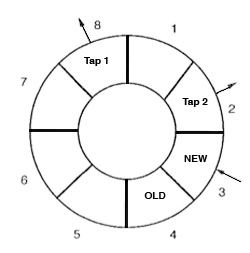
Schematic of a simple digital delay line with taps
In this diagram, we use only 8 samples to keep things
simple, and they are shown as a ring because of the
wrap-around function just explained. Samples are written
in order to the memory locations 1, 2 and in the diagram,
the newest sample is written to memory location 3. That
means that memory locations 4 around to 2 are “old”
samples, the oldest being the current value of location 4
which will be over-written at the next step of recording.
The value of any other of these past samples can be read
as a “
tap”, similar to a playback head on the tape
recorder. The number of taps determines how many delays
can be accessed (in this diagram, two) and their position
can change.
Two issues that arise with delay lines should be mentioned
before we look at various processors and plug-ins below.
The first is how
smoothly the signal transitions
between different delay values. In a poor implementation
there can be
clicks or other artifacts as the
delay values are changed. This is because there can be
discontinuities in the waveform when samples from
different points in time are encountered during these
changes, unless an interpolation algorithm is used.
The second issue, of particular relevance for phasing, is
how the entire
time range for the delays is
handled. If it is handled linearly, then the critical
range for phasing (less than 10 ms) will be crunched into
a minuscule area of the control interface where it can’t
be properly tuned. At this level of microsound (less than
50 ms) even 1 ms intervals can make a big difference in
the output. Similarly, large delays may take a long time
to scroll through to find the desired values. In general,
a
logarithmic control interface is preferable.
In the 1980s when digital memory was
still expensive, a large number of hardware digital delay
units were manufactured, and arguably the Lexicon models
were one of the most prominent. They were quite expensive
and only sold to audio studios, and these now “classic”
modules still command good prices on the used market.
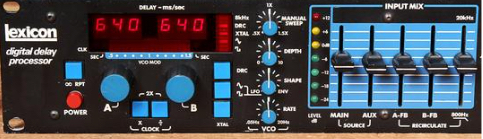 Lexicon Digital
Delay unit
Lexicon Digital
Delay unit
The Lexicon Prime Time II model 95 shown here provided
an excellent control interface for the user. The version
at Simon Fraser University was equipped with enough
memory to allow a maximum 2.56 sec delay to be realized
with two output delays, A & B, that could be
individually set (and doubled with a half sampling
rate). The Input Mix at right allowed a mix of the
original mono signal with the A and B delays treated as
a stereo pair, along with a sensitive feedback
level and a low-pass filter for keeping the
feedback levels from getting too bright. At the low end
of the delay range, millisecond values could be
precisely tuned for phasing.
The most useful part of its operation was the series of
control knobs in the middle which allowed a mix of
various types of modulation of the delays: a
manual sweep, a VCO (voltage-controlled subaudio
oscillator) for modulating with a sine or square wave
with variable frequency and depth, and an envelope
follower for correlating the delays with
the amplitude of the input signal. This type of
correlation was used for the carding wool phasing
examples above.
An “infinite repeat” switch at the left froze the
contents of the memory, similar to a tape loop. However,
the delay taps were still working at processing the
contents of the memory. Therefore, the doubling of the
delay times could lower the pitch by an octave (similar
to playing a loop at half speed), and changing the VCO
and other modulations to create additional effects.
Under the red visual display of the delays, a “flying
beam” gave an effective display of the instantaneous
modulated delays.
Harmonization and other pitch
changes. Even though it’s not about delays, the
delay line itself can be used to change the pitch of the
output, or to modulate it. The general rule is that when
the record and playback rates are equal, there will be
no change in pitch, whether we’re referring to
tape speed or digital sampling rate. Likewise, when the
playback rate is different from that of the recording, a
change in pitch will occur.
For instance, when we step through a delay line one
sample at a time, there’s no pitch change, as long as
the sampling rate hasn't changed. But if we skipped
every other sample (a sample increment of 2) the
sound would rise one octave, and likewise if we repeated
every sample (increment of .5) the sound would fall an
octave. If we stick to integer increments, such as 1, 2,
3, 4, then those pitches will all be harmonics,
and if those taps are combined with the original, the
effect is called harmonization.
Similarly, when we modulate the delays
regularly, we are actually stepping forwards and
then backwards through the delay line around the
average, and therefore a smooth rise and fall of pitch
will result if the modulator is a sine wave. This kind
of delay
modulation is often called flanging.
It might be thought that there is no
analog equivalent of such pitch changes, but in fact a
specially adapted tape recorder called a tempophone
was designed in Europe to change the pitch of a
recording without altering its duration. The key to this
solution was a rotating set of playback heads, attached
to all sides of the circular mechanism, and spaced such
that one head was always in contact with the tape.
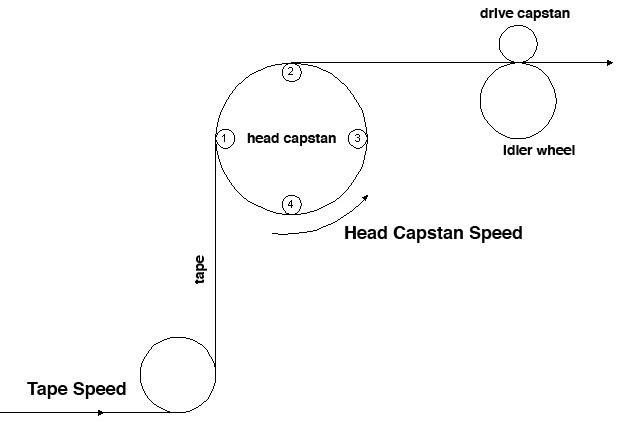 Tempophone
with
rotating heads (click to enlarge)
Tempophone
with
rotating heads (click to enlarge)
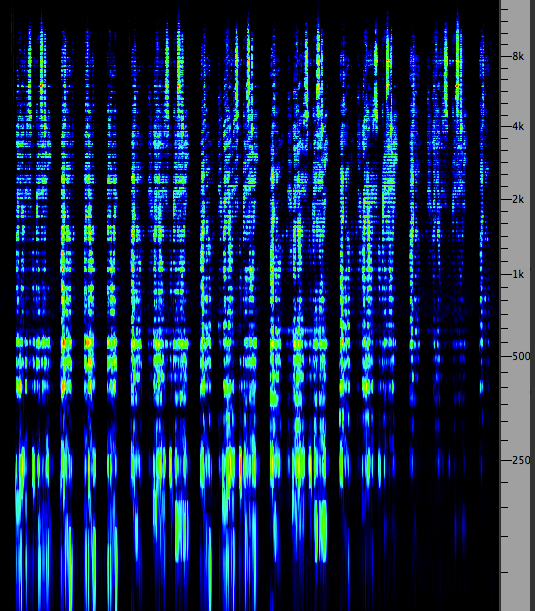
Compositional example. Two
voices are reading a text from the Song of Solomon in
Barry Truax’s Song of Songs (1992) which is
processed with a comb filter with various time delays
(i.e. taps), as well as a high-pass filter towards the
end.
Text phasing in Song of Songs
|
Click to enlarge
|
Index
D. Echo and feedback at longer delays.
When the time delay for a repetition is long enough for
the auditory system to determine that it is a separate
event, as opposed to being fused with the original
sound, we normally regard the delayed version as an echo.
Of course, the echo as a separate event depends on the
original sound being relatively short, or at least in
its decay portion before the echo arrives. Otherwise,
with a longer sound, the echo will be masked by
the original and not be heard as a repetition.
The theoretical minimum delay for this kind of
separation is 50 ms, but that can only be
demonstrated in a laboratory situation with very short
clicks heard on headphones. In the case of actual
reverberation, the topic of the next module,
acousticians regard early reflections as those
arriving within the first 80 ms which reinforce
and fuse with the original sound. They also provide a
wider spatial perspective, since the reflections come
from a side angle, but preferably not too wide. These
early reflections are highly desirable in concert hall
acoustics, as discussed in the Sound-Environment
Interaction module.
Besides the duration of the original sound, the other
variable that determines whether a sound is heard as an
echo is its strength (which depends on the
reflectivity of the surface producing the reflection)
and whether the original sound has a sharp attack
and therefore is less likely to mask the echo. If the
delay is longer than 100 ms, and reasonably
strong, it will likely be heard as an echo. As
such it creates a rhythmic relationship with the
original.
Very long delays, on the order of several seconds, can
occur outdoors and have always fascinated listeners. We
talk about “bouncing” a sound off of a distant wall with
a short clap or shout when there is only one
primary surface to produce the reflection. The frequency
response of the surface, as well as reflections
off the intervening ground or water, will colour the
echo, but it always can be recognized as the “same”
sound. Not surprisingly the effect is cited in many
legends and stories where the echo often is regarded as
a manifestation of some “other” being or spirit that
perhaps is answering or mocking us.
Echo
from across a lake
Slap echo under a parabolic bridge from a
handclap
Slap echo in Place Victoria Metro station,
Montréal |

|
Index
E. Studio demo’s of phasing, echo and
feedback. We will start with a very simple but
typical delay processor with just the four most basic
parameters: (1) the traditional dry/wet mix
expressed as a percentage of how much processed (i.e. wet)
sound is mixed with the original (i.e. the dry sound); (2)
the delay time in seconds (max. 2) which uses
decimal places but will be very difficult to tune in the
low phasing region as the steps are too large; (3) feedback
level in percentage up to 100% with a negative
version that inverts the phase of the feedback and (4) a low-pass
cutoff frequency to minimize the brightness level of
the feedback. There are no separate controls for each
stereo channel.

Next we will consider the standard plug-ins used in the
Audition editor for processing. The carding sound used
earlier in the phasing demo’s will be used again as a
source for comparison. The two examples are of phasing and
what the software calls flanging.
In the Delay plug-in, which we will use to produce
phasing, delay times in milliseconds allow a very
precise value to be typed in, with separate values for the
left and right channels, in this case 2 and 3 ms. Given
that it is difficult to use the slider in the middle for
such precise values, it is easier to type in the desired
number (or drag the parameter value which increments by .1
ms). The wet/dry mix (i.e. original + processed) should be
set to 50% for each since the intent is probably to have
the strongest effect.
A nice option here is to invert the signal on one
or both channels. This means that the cancelled
frequencies are shifted. Given that Audition allows the
left and right channels to be soloed during this process
(which works best with the loop playback on), one can hear
the differences easily, even though they fuse in the
stereo version (as you can tell by listening to one
channel, then the other).
Carding with stereo phasing
Source: WSP Can 33 take 1& 2 |

|
Carding with Flange
|
|
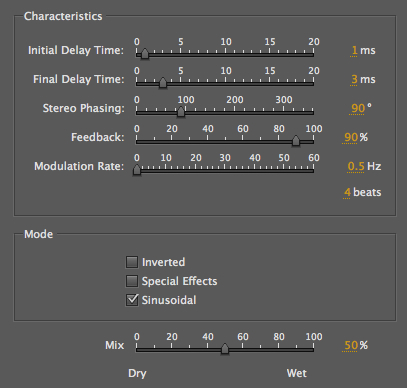
In the Flange example, it’s all
about modulation. The top two controls allow you
to choose the minimum and maximum (labelled initial and
final) delays in the sinusoidal modulation, plus the
all-important rate at the bottom. In this case,
we chose a very slow subaudio rate (0.5 Hz which means
the cycle is 2 sec), so the effect would be subtle, but
this can still be heard as a slow upward and downward
pitch proceeding independent of the sound. Feedback was
set to 90% to add a somewhat harmonic pitch to the
result.
Next we use Audition’s Delay & Echo plug-ins with
longer delays applied to create rhythmic
enhancements of this short hammering on wood recording,
which you can download here
(control click or right click). However the delays can
either follow the original (plus values) or precede
it (negative values), a choice that wouldn’t be
available in the analog domain. By adjusting the dry/wet
percentages, an interesting psychoacoustic effect
occurs. When the mix is 50/50, we hear the echo as rhythmic
enhancement. But when it is 80% wet and precedes the
original, then the latter is heard as a spatial echo.
Note that a similar effect could be specified with the
echo following the original at 20%, but with a slightly
different rhythm.
Hammering with L/R rhythmic
additions of 120 and 180 ms delays
|

|
The echoes now precede each hit
which is heard as a spatial echo
|

|
The Echo plug-in is actually a
misnomer as the delays are only heard when the feedback
level is brought up, so multiple days are always heard.
This becomes a feedback circuit which raises a
difficult issue with how we do this process in editors –
it can be heard dynamically with the build up of
feedback levels, but when applied permanently, there is
no additional duration added, and so we are
getting only the first pass of the buildup. This problem
will be addressed differently below.
Hammering rhythm with feedback
|

|
In fact, in order to avoid the feedback being abruptly
curtailed, we had to add several seconds of
silence, as in this example, if we want to hear the
feedback continue. By taking the process out of real
time (which was the only option in the analog domain),
the process is frozen into a single pass of the circuit.
On the other hand, in this plug-in, there is a useful EQ
at the right where the spectrum can be adjusted, even if
it is done just once.
Finally we listen to the process of
digital Chorusing, which as discussed above, is
not the same as the acoustic choral
effect where multiple voices blend together
with small de-tunings and staggered entry delays. This
is Audition’s version of a 5-voice chorusing with a bass
voice. As you can see from the parameters, modulation is
being used to create the illusion of small pitch shifts,
but in fact, one can still hear the modulation going on.
But, it’s still a very enriched sound.
5-voice chorusing with a bass
voice
(Derrick Christian)
|

|
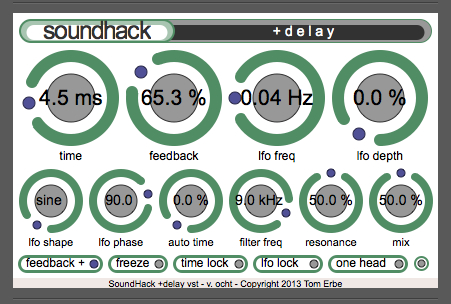
A different, more graphic approach to
many of the same variables can be found with SoundHack’s
Delay Line (part of the free download called the
Delay Trio). The lefthand screenshot shows a typical
phasing setting. The slider knob is intelligently
calibrated in a logarithmic manner, so that very small time
delays needed for phasing are in 0.2 ms steps, whereas
for long delays (max 5 sec) the steps are much larger.
As a result, the delays are very easy to adjust. The
righthand screenshot shows a typical rhythmic delay
setting (just under .5 sec), with about 70% feedback.
This is one of the few apps where a feedback control is
allowed to exceed 100%, indicating that this
module is designed for live performance, where the level
can be brought back down again quickly.
Most of the other sliders (shown as knobs)
control the rate, depth and phase of the delay
modulation, along with a slider at the lower left
which switches from sine to triangle, square, up and
down ramps, and random. Resonance can also be added to
the low-pass filter as a percentage. The switches at the
bottom can change the feedback from + to -,
which is useful in phasing. Possibly influenced by the
Lexicon “infinite repeat” button shown above, the memory
can be frozen as a loop. The last switch at the
bottom right brings in two delay taps which are
cross-faded and used to smooth the steps in a ramp.
Recording dynamic processes that
use feedback. As discussed in the previous module,
recording interactive changes in any of these
modules is not part of the plug-in paradigm.
Interactivity is assumed to only be relevant while you
are testing and adjusting the settings, then you “apply”
them, and the result is fixed. We also discussed in that
previous module some solutions that could be applied,
such as recording the output to another program, but in
a laptop situation, for instance, that is not possible.
Instead, we showed a simple DAW design for automating
parameters in a session and recording changes in
individual parameter settings the same way one records
mixing levels, i.e. by latching them. In this
module we have commented on a particularly difficult
process to integrate into digital software, namely an
active feedback circuit.
In the analog circuits we have shown, it was taken for
granted that the result, of any length, could be stored
on tape. However, the plug-in paradigm allows the
process to be stored only in the same length as
the original file, and therefore it arbitrarily cuts off
the sound of the feedback tail. The only easy solution
is to add several seconds of silence if you want
to capture that slow decay.
On the other hand, if we were to program to feedback
level in a DAW session, such that it fell back to zero
at the end, it wouldn’t take long for the feedback sound
to disappear. Of course it could also be raised and
lowered during the sound itself by the same method. Here
is a simple example that illustrates a direction that
could be followed (click to enlarge)
Feedback mix with automated levels
|
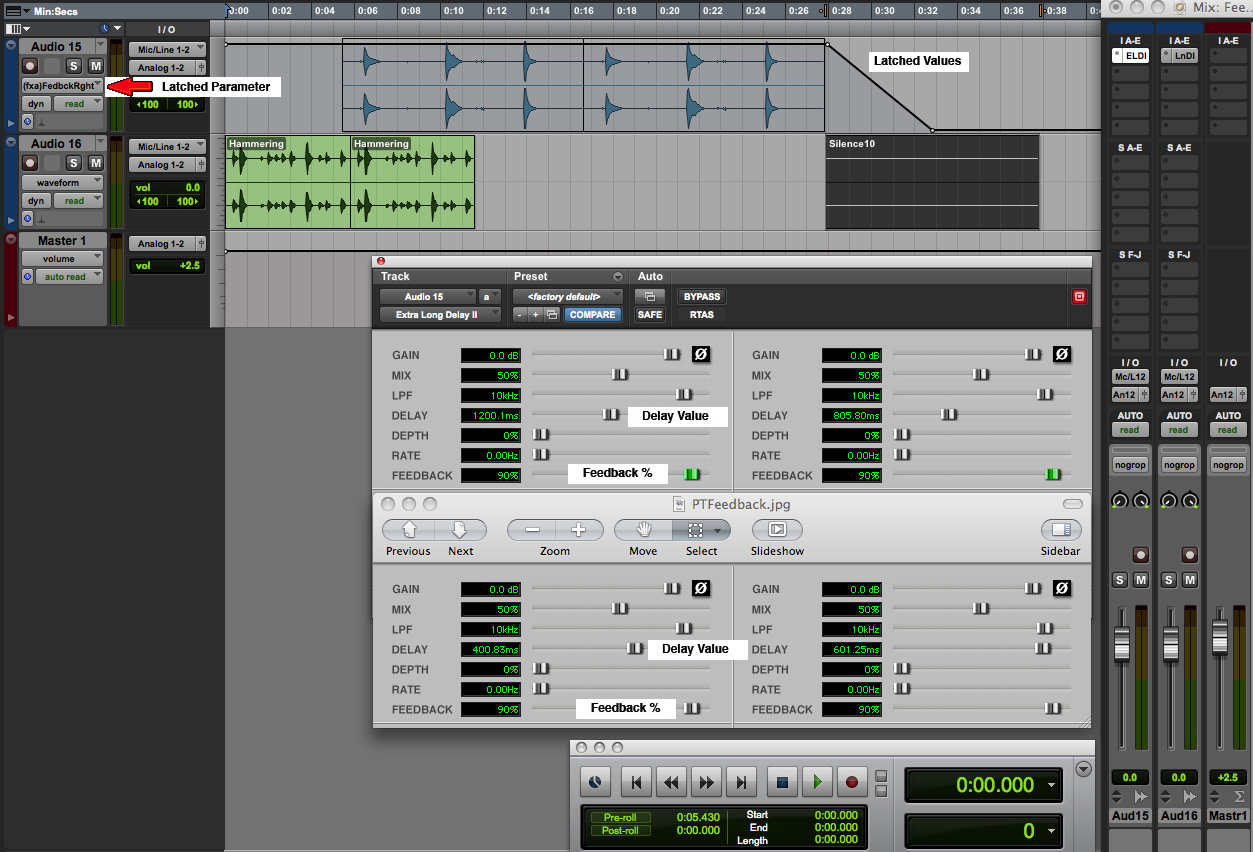
Click to enlarge |
We
start with the hammering (green track) used above with
two short stereo delays (400 and 600 ms) and 90%
feedback. We then bring in another rhythmic sound, the
PVC pipe (blue track) with delays of 800 and 1200 ms,
and that allows the hammering feedback to continue
without adding any silence. Then at the end of the PVC
track, we add 10 seconds of silence to allow its
feedback to continue. However, in general it’s hard to
calculate how long that might last. So, the most elegant
solution is to automate the feedback level, both
left and right versions, and ramp them down at the end.
This feedback level control is shown on the top track.
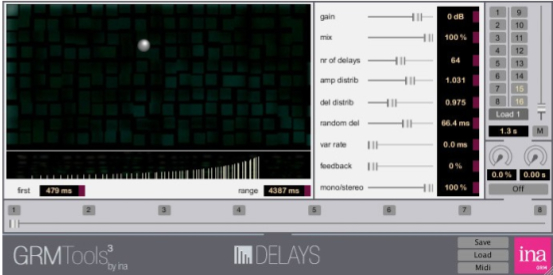
Finally we will make a brief reference
to two very rich processes offered in GRM Tools,
namely Delays and Comb. With the former,
you are offered an array of up to 128 delay lines (!)
with a clever means of distributing them, weighted
towards the top in terms of spacing, as shown, or
towards the bottom, or even throughout; amplitude
distributions increasing as shown, or decreasing. Some
degree of randomness can be added, as well as feedback
levels. Unless you limit yourself to a subset of these
parameters, the effect will be very strong – and will
tend to dominate everything else in a mix.
|
|
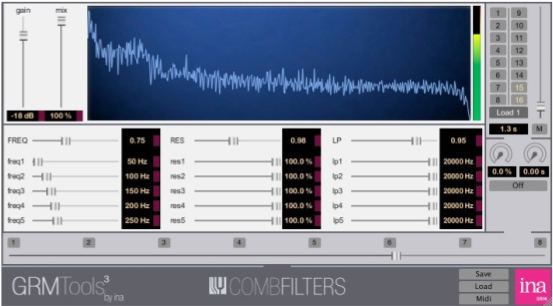
The comb filter is also quite grand, offering a
bank of 5 comb filters, all individually tunable, with
varying degrees of resonance (i.e. feedback) to add a
rich harmonic spectrum, low-pass filters on each comb to
manage the brightness, and a global frequency shifter
for upward and downward transposition, as well as global
controls for the resonance and low-pass filtering.
Again, very impressive, but must be handled with care!
Personal Studio
Experiments. If you have been following
the personal studio experiments suggested in the
previous two EA modules, you will find a lot of scope
for extensions of those materials in this module. First
you need to examine the available plug-ins you have for
the time domain and try to identify the key control
elements as discussed here. Pay particular attention to
the lowest delay range to see if it is amenable to very
small steps as shown for phasing.
If you are experimenting with rhythmic variants created
with echoes, you’ll need some time to find the correct
time values that will work with your rhythmic sounds
and/or loops. If you start to experiment with feedback,
you’ll have to find the means to deal with its dynamic
behaviour, both in terms of the effects produced, and
the problem of recording them. If you’ve already created
some DAW circuits especially designed for processing, as
suggested in previous modules, you may want to do the
same for feedback processes as suggested here.
In terms of composition, everything is open-ended of
course, but it might be wise to have fully explored the
timbral domain changes (including pitch), and now the
temporal domain processes, before you start constructing
a mixing session. The two domains, frequency and time,
work quite differently and produce different kinds of
results, so in terms of exploring your material, both
areas should be thoroughly tried out.
Index
Q. Try
this review quiz
to test your comprehension of the above material,
and perhaps to clarify some distinctions you may
have missed.
home