Perform a Regression Analysis
To run a simple linear regression on the Fitness data,
follow these steps.
- Select Statistics
 Regression
Simple ... to select the Simple Regression task.
Regression
Simple ... to select the Simple Regression task.
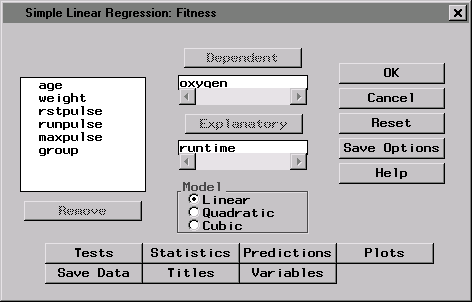
- In the Simple Linear Regression dialog, select oxygen from
the list and click on the Dependent button to designate oxygen
consumption as the dependent variable. Select runtime from the
list and click on the Explanatory button to designate the amount
of time to run 1.5 miles as the explanatory variable.
Figure 1.3: Dependent and Explanatory Variables
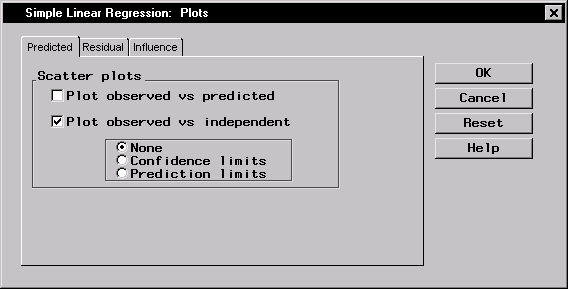
- To create a scatter plot of your results, click on the Plots
button. In the Predicted tab, select Plot observed vs
independent.
Figure 1.4: Scatter Plot
Click OK.
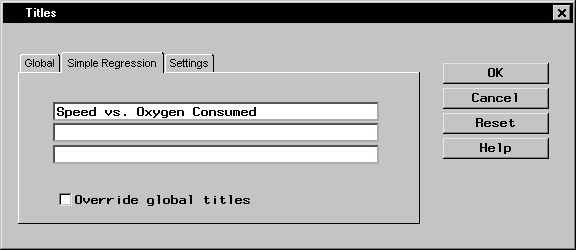
- In the Simple Linear Regression dialog, click on the Titles
button to specify a title for your results. In the first field
of the Titles dialog, type Speed vs. Oxygen Consumed.
Figure 1.5: Title
Click OK.
- Click OK in the Simple Linear Regression dialog to generate
the results.
Copyright © 1999 by SAS Institute Inc., Cary, NC, USA. All rights reserved.