
Chapter Contents

Previous

Next
|
Chapter Contents |
Previous |
Next |
| Tutorial: A Module for Linear Regression |
Because IML is built around traditional matrix algebra notation, it is often possible to directly translate mathematical methods from matrix algebraic expressions into executable IML statements. For example, consider the problem of solving three simultaneous equations:
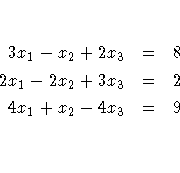
![[ 3 & -1 & 2 \ 2 & -2 & 3 \ 4 & 1 & -4 \ ]
[ x_1 \
x_2 \ x_3 \ ]
=
[ 8 \ 2 \ 9 \ ]](images/im3eq2.gif)
   > proc iml;

   IML Ready
Enter
> reset print;The PRINT option of the RESET command causes automatic printing of results. Notice that as you submit each statement, it is executed and the results are displayed. While you are learning IML or developing modules, it is a good idea to have all results printed automatically. Once you are familiar with SAS/IML software, you will not need to use automatic printing.
Next, set up the matrices A and c. Both of these matrices are input as matrix literals; that is, input the row and column values as discussed in Chapter 2, "Understanding the Language."
   > a={3  -1  2,
   >    2  -2  3,
   >    4   1 -4};

               A             3 rows      3 cols    (numeric)

                                3        -1         2
                                2        -2         3
                                4         1        -4

   > c={8, 2, 9};

                C             3 rows      1 col     (numeric)

                                          8
                                          2
                                          9
Now write the solution equation,
x = A-1c, as an IML statement.
The appropriate statement is an assignment statement
that uses a built-in function and an operator (INV is
a built-in function that takes the inverse of a square
matrix, and * is the operator for matrix multiplication).
   > x=inv(a)*c;

              X             3 rows      1 col     (numeric)

                                          3
                                          5
                                          2
After IML executes the statement, the first row of matrix X contains the x1 value for which you are solving, the second row contains the x2 value, and the third row contains the x3 value.
Now end the session by entering the QUIT command.
   >   quit;

       Exiting IML
|
Chapter Contents |
Previous |
Next |
 Top |
Copyright © 1999 by SAS Institute Inc., Cary, NC, USA. All rights reserved.