
Chapter Contents
![[*]](../../common/images/prev1.gif)
Previous

Next
|
Chapter Contents |
Previous |
Next |
| SAS/INSIGHT Software |
When there are two explanatory variables in the model, a parametric response surface plot is created by default. You can also generate a nonparametric kernel or thin-plate smoothing spline response surface plot. With more than two explanatory variables in the model, a parametric profile of response surface plot with the first two explanatory variables can be created. The values of the remaining explanatory variables are set to their corresponding means in the plot. You can use sliders to change the values of the remaining explanatory variables.
With two explanatory interval variables in the model, a parametric surface plot is a continuous surface plot of the predicted responses from the fitted parametric model on a set of regular grids of the explanatory variables.
Two criteria can be used to select an estimator
 for the function f:
A standard measure of goodness of fit is the mean residual sum of squares
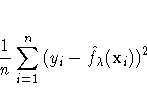
A measure of the smoothness of a fit is an integrated squared second derivative
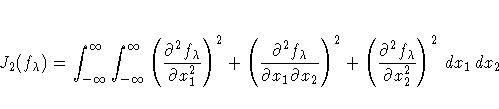
A single criterion that combines the two criteria is then given by
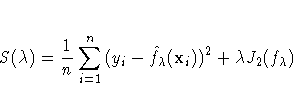
where belongs to the set of
all continuously differentiable functions with square integrable
second derivatives, and  is a positive constant.
The estimator that results from minimizing S()is called a thin-plate smoothing spline estimator.
Wahba and Wendelberger (1980) derived a closed form expression
for the thin-plate smoothing spline estimator.
Note: The computations for a thin-plate smoothing spline is time-intensive, especially for large data sets.
The smoothing parameter controls the amount of
smoothing; that is, it controls the trade-off between the
goodness of fit to the data and the smoothness of the fit.
You select a smoothing parameter by
specifying a constant c in the formula

The values of the explanatory variables are scaled by their corresponding interquartile ranges before the computations. This makes the computations independent of the units of X1 and X2.
After choosing Graphs:Surface Plot:Spline from the menu, you specify a smoothing parameter selection method in the Spline Fit dialog.
The default Method:GCV uses a c value that
minimizes the generalized cross-validation mean
squared error 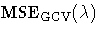 .
.
A kernel estimator uses an explicitly defined set of weights at each point x to produce the estimate at x. The kernel estimator of f has the form
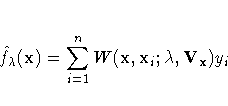
where W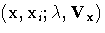 is the weight function that depends on the smoothing parameter and
the diagonal matrix Vx of sample interquartile ranges.
is the weight function that depends on the smoothing parameter and
the diagonal matrix Vx of sample interquartile ranges.
The weights are derived from a single function that is independent of the design
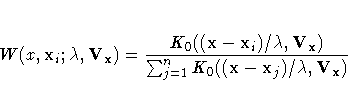
where K0 is a kernel function and
is the bandwidth or smoothing parameter.
The weights are nonnegative and sum to 1.
Symmetric probability density functions commonly used as kernel functions are




You select a bandwidth for each kernel
estimator by specifying c in the formula

where n is the sample size.
Both and c are independent of the units of X.
SAS/INSIGHT software divides the range of each explanatory variable into a number of evenly spaced intervals, then estimate the kernel fit on this grid. For a data point xi that lies between two grid points, a linear interpolation is used to compute the predicted value. For xi that lies inside a square of grid points, a pair of points that on the same vertical line as xi and each lies between two grid points can be found. A linear interpolation of these two points is used to compute the predicted value.
After choosing Graphs:Surface Plot:Kernel from the menu, you specify a kernel and smoothing parameter selection method in the Kernel Fit dialog.
By default, SAS/INSIGHT software divides the range of
each explanatory variable into 20 evenly spaced intervals,
uses a normal weight, and uses a c value that minimizes
.
With more than two explanatory interval variables in the model, a parametric profile surface plot is a continuous surface plot of the predicted responses from the fitted parametric model on a set of regular grids of a pair of explanatory variables. The values of the remaining explanatory variables are initially set at their means and can be adjusted with the sliders.
By default, the first two explanatory variables are used in the surface plot. You can also create profile surface plots for other explanatory variables by selecting the two variables before choosing Graphs:Surface Plot:Parametric profile.
|
Chapter Contents |
Previous |
Next |
 Top |
Copyright © 1999 by SAS Insitute Inc., Cary, NC, USA. All rights reserved.