Help -- Tips on viewing these pages:
-
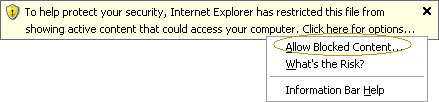
I click on the link to an English translation page and I see a warning about active content. What should I do?
- The English translations are in Adobe's .pdf file format and are safe to open. Click on "Allow Blocked Content..." to view the translations.
Can I keyword search any of these documents?
- You may perform keyword searches on the English translations by using Adobe's find button:

-
Can I enlarge the text when viewing the English translations?
- You may enlarge the text by using Adobe's zoom in and out tool:

-
Can I increase or decrease the size of the text which displays on the main page?
- Yes, use your Web browser's "View", then "Text size" option at the top of the screen.
-
Can I enlarge the size of the scanned images of the Gujarati text?
- Yes. Either:
- hold down the Ctrl key while using the scrolling wheel on your mouse to shrink or enlarge the text or
- hold your mouse over the image of the Gujarai text. When using Internet Explorer, you may see a button in the lower right hand corner of the image that will allow you to enlarge it. From within Mozilla Firefox, click on the magnifying glass to enlarge the image.
|
|
