|

|
|
| Relationships in geodatabase
structure. Source: Modeling Our World: The ESRI Guide to Geodatabase Design. ESRI Press, 1999. |
|
|
Geodatabases
and Relationships
A Geodatabase is a relational database that
contains both vector and raster tables along with other GIS data and
the various 'relationships' between the data. Its hierarchical structure
uses "primary" and "secondary" keys as a way of
relating various feature classes and attribute tables. These relationships
can be one-to-one, one-to-many, or many-to-many depending on how various
variables are related. Essentially, the geodatabase allows one to
define relationships between various geographical objects, and provides
rules for maintaining these relationships.
|

|
|
Creation of the UML
diagram and its transfer into the Geodatabase.
Note the choice between using XMI or a Microsoft Repository. Source: ESRI
Virtual Campus Web Course - Creating a Geodatabase, Lesson 1: Setting up a
Geodatabase.
|

|
|
Geodatabases
and Data Modeling
Data Modeling is the process of
defining GIS data in terms of its inherent relationships and characteristics.
This requires definition of the general scope and business requirements
of a database (Lo, C.P. and Yeung, K.W. 2002). This modeling approach
is supported by ArcGIS during Geodatabase creation.
The data model is first entered as Unified Modeling Language (UML)
into Microsoft Visio with all geographical object relationships being
defined. Programs known as Computer Aided Software Engineering (CASE)
tools (incorporated to ArcCatalog) help to generate a geodatabase
schema from the UML model by developing XMI (XML Metadata Interchange)
files. XMI or Microsoft Repository files are intermediate formats
for CASE Tools in creating the geodatabase schema. XMI format creates
personal geodatabases while Microsoft Repository creates personal
or multiuser geodatabases.
The XMI file format is preferred because it
is faster and preferred to the Microsoft Repository. The XMI file
is imported through the CASE Tools schema wizard, which creates empty
feature class layers, attribute class tables, relationship class tables,
and the associated relationships originally established in the UML
data model. ArcCatalog now contains an empty geodatabase. Feature
layers are keyed in as ESRI Feature Classes in Visio while attribute
tables are keyed in as ESRI Object Classes. The relationships between
layers, as well as the attribute column names and length are mapped.
After exporting the UML model to XMI or Microsoft Repository database
file, semantic checks are performed to finalize the geodatabase.
|
|

|
|
|
Personal Geodatabase. Source: ESRI Virtual Campus
Web Course - Introducing
the Geodatabase, Lesson 1: Geodatabase Basics, 2002.
|
|
|
|
|
|
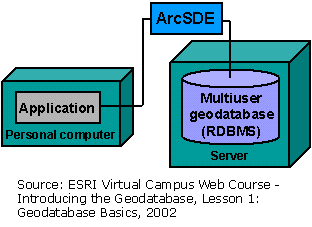
Multiuser Geodatabase. Source: ESRI Virtual Campus
Web Course - Introducing
the Geodatabase, Lesson 1: Geodatabase Basics, 2002.
|
|
|
Personal
and Multiuser Geodatabases
A Geodatabase data model can be either personal
or multiuser (enterprise). Personal Geodatabases are stored as Microsoft
Access database files and allow many readers, but with a single editor.
Multiuser Geodatabases, also known as ArcSDE Geodatabases, are used
with relational database management systems (RDMS) such as Microsoft
SQL Server or Oracle, which can be read and edited by many users (hence
multiuser). The product provided to the District is a Personal Geodatabase,
but can be readily converted to Multiuser Geodatabase by a series of
simple steps.
Note: Since District of Pitt Meadows uses ArcGIS and Microsoft Sequel
(SQL) Server, the selection of the database format is limited to that
of an ArcGIS Geodatabase.
|
| |
Data Standardization
One of the members of OD contacted a majority of GVRD municipalities
to try to determine any existing municipal standards for data or data
models. It was determined that essentially none exist, and that each
municipality typically develops their own standards originating from
historic data organization and drafting standards/naming conventions.
For now, universal naming and structuring of municipal data is not a
reality.
In the past few years, however, the Integrated
Cadastral Initiative (ICI) was launched as an attempt to standardize
data collection, attribute names, metadata, and geodatabase structure.
The ICI is defined as 'a partnership among local governments, utility
companies, and provincial agencies for establishing, maintaining, and
distributing the ICI database'. The ICI database contains province-wide
data for the integrated parcel fabric and related parcel links (i.e.
utilities), and permits easier data sharing between participating groups.
Until now, of Lower Mainland municipalities, only Pitt Meadows and Surrey
have joined the ICI family.
Data standardization was a high priority for
OD. In an attempt to standardize the data, OD followed the ICI naming
attribute convention (data name, data type and data size), and more
generally the "Integrated Cadastral Fabric (ICF) Standards and
Specifications" standards, wherever possible. Metadata standards
were based on the ArcCatalog FGDC/ESRI metadata structure, currently
used by the Victoria Capital Regional District under the guidance of
the Integrated Cadastral Initiative Society (ICIS).
|
| |
|
| |
|



.gif)
