
Chapter Contents

Previous

Next
|
Chapter Contents |
Previous |
Next |
| Adjusting Axes and Ticks |
You can change the default tick marks in a histogram of verbal SAT scores by following these steps.
 | Open the GPA data set and create a histogram of verbal SAT scores. |
| Select the variable on the axis of interest. |
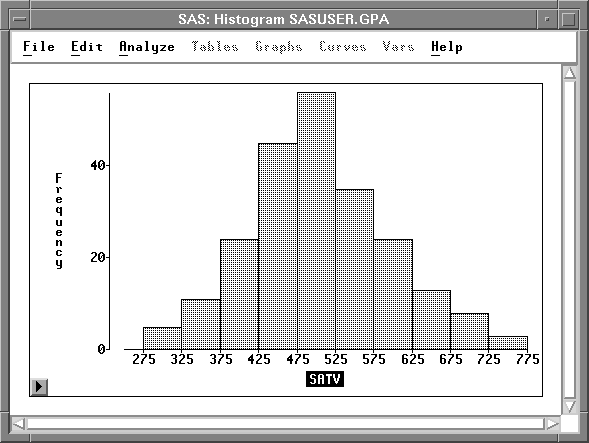
| Click on the button in the lower left corner to display the histogram pop-up menu. |
Choose Ticks from the pop-up menu to display the Ticks dialog.
![[menu]](images/axieq1.gif)
Figure 7.3: Histogram Pop-up Menu
Figure 7.4 shows the Ticks dialog for the SATV axis in the histogram.
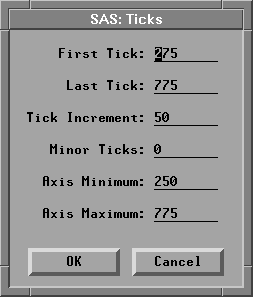
| Change the values in the Ticks dialog. |
Set the first tick to 200, the last tick to 800, the axis
minimum to 175, and the axis maximum to 825.
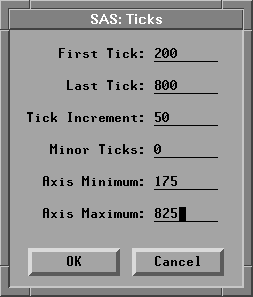
| Click OK to redraw the histogram with the new tick specifications. |
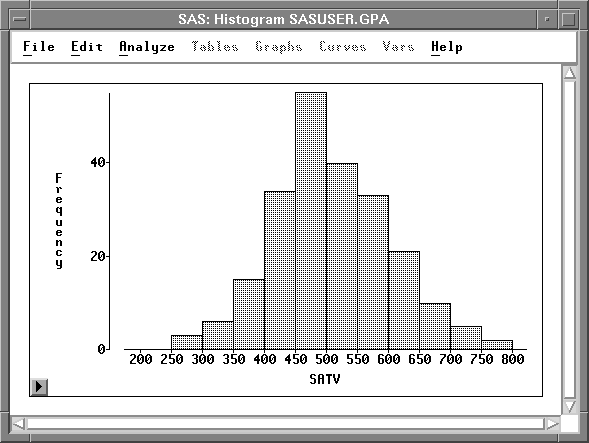
You can use the Ticks dialog similarly to scale axes in all other two-dimensional and three-dimensional graphs.
|
Chapter Contents |
Previous |
Next |
 Top |
Copyright © 1999 by SAS Institute Inc., Cary, NC, USA. All rights reserved.