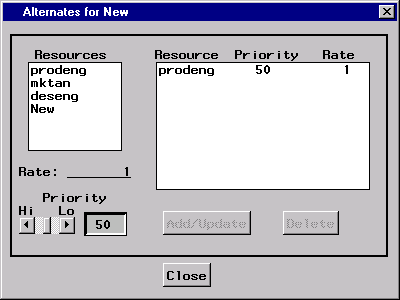
Alternates Window
This window enables you to specify the alternates profile for the current
resource. By adding records to the profile, you can indicate which resources
and at what rate those resources can be substituted for the current resource.
Alternate resources are purely optional, but they can be very helpful in reducing
resource infeasibilities. Only resources of the same type (consumable or
replenishable) can be substituted for one another.
The Resources list contains all of the resources defined for the project that
are of the same type (replenishable or consumable) as the current resource, as
substitutions can only be made by like-typed resources. Selecting one or more
resources in this list enables you to add records to the
alternates profile.
The Rate field is used to specify the rate of substitution for an alternate
resource specification. For example, if resource Z is to be substituted for
resource X with a substitution rate of 0.5, an activity that requires 1 unit of
resource X could be completed with 0.5 units of resource Z.
The horizontal slider can be used to indicate a priority for an alternate
resource specification. Lower numbers indicate higher priority. This priority
is used to order the resources that are listed as alternates (substitutes) for
the current resource.
The Alternates Profile indicates the resources that are eligible to be
substituted for the current resource (if it should be unavailable during project
scheduling). Records in this list are ordered by priority to
indicate the order in which substitutions would be made (if needed).
To add or update records in the list, select one or more resources in the
Resources list, specify the
rate of substitution and the priority, and
press the Add/Update button. To delete records from the list,
select the desired records and press the Delete button.
Pressing the Add/Update button adds or updates a record in the
alternates profile depending on the current
resource, rate, and
priority settings.
Pressing the Delete button removes the currently selected records in
the alternates profile. Note that deletions cannot be
aborted unless changes to the resource are not saved.
Copyright © 1999 by SAS Institute Inc., Cary, NC, USA. All rights reserved.