
Chapter Contents

Previous

Next
|
Chapter Contents |
Previous |
Next |
| PCHART Statement |
| See SHWPEX2 in the SAS/QC Sample Library |
In some situations, a standard (known) value (p0) is available for the expected proportion of nonconforming items, based on extensive testing or previous sampling. This example illustrates how you can specify p0 to create a p chart.
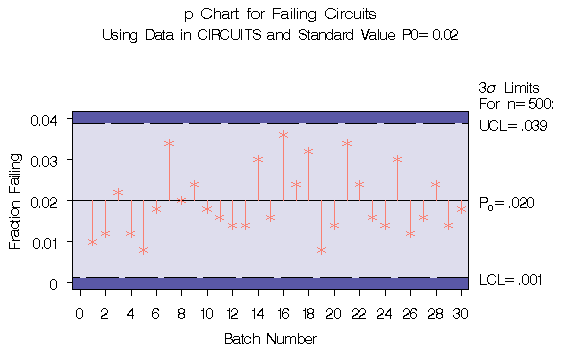
A p chart is used to monitor the proportion of failing circuits in the data set CIRCUITS, which is introduced at "Creating p Charts from Count Data" . The expected proportion is known to be p0=0.02. The following statements create a p chart, shown in Output 38.2.1, using p0 to compute the control limits:
   title1 'p Chart for Failing Circuits';
   title2 'Using Data in CIRCUITS and Standard Value P0=0.02';
   symbol v=star c=salmon;
   proc shewhart data=circuits;
      pchart fail*batch / subgroupn = 500
                          p0        = 0.02
                          psymbol   = p0
                          nolegend
                          needles
                          cframe    = lib
                          cinfill   = bwh
                          cneedles  = salmon;
      label batch = 'Batch Number'
            fail  = 'Fraction Failing';
   run;
|
Alternatively, you can specify p0 using the variable _P_
in a LIMITS= data set,*
as follows:
   data climits;
      length _var_ _subgrp_ _type_ $8;
      _p_      = 0.02;
      _subgrp_ = 'batch';
      _var_    = 'fail';
      _type_   = 'STANDARD';
      _limitn_ = 500;
   run;

   proc shewhart data=circuits limits=climits;
      pchart fail*batch / subgroupn = 500
                          psymbol   = p0
                          nolegend
                          needles;
      label batch ='Batch Number'
            fail  ='Fraction Failing';
   run;
The bookkeeping variable _TYPE_ indicates that _P_ has a standard value. The chart produced by these statements is identical to the chart in Output 38.2.1.
|
Chapter Contents |
Previous |
Next |
 Top |
Copyright © 1999 by SAS Institute Inc., Cary, NC, USA. All rights reserved.