
Chapter Contents

Previous

Next
|
Chapter Contents |
Previous |
Next |
| RCHART Statement |
| See SHWREX1 in the SAS/QC Sample Library |
This example demonstrates how to create R charts
with probability limits.
The following statements read the disk drive test times
from the data set DISKS (see
"Creating Range Charts from Raw Data" ) and create
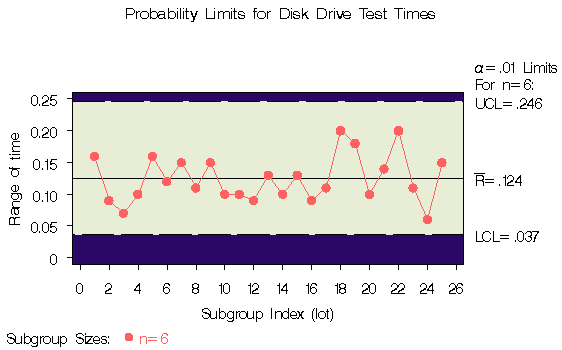
the R chart shown in Output 39.1.1:
   title 'Probability Limits for Disk Drive Test Times';
   symbol v=dot c=rose;
   proc shewhart data=disks;
      rchart time*lot / alpha     = .01
                        outlimits = dlimits
                        cframe    = vipb
                        cinfill   = ywh
                        cconnect  = rose;
   run;
The ALPHA= option specifies the probability ( ) that a
subgroup range exceeds its limits.
Here, the limits are computed so that the probability
that a range
is less than the lower limit is
) that a
subgroup range exceeds its limits.
Here, the limits are computed so that the probability
that a range
is less than the lower limit is  ,and the probability that a range
is greater than the upper limit is .This assumes
that the measurements are normally distributed.
The OUTLIMITS= option names an output data set that saves
the probability limits.
A listing of DLIMITS is shown in Output 39.1.2.
,and the probability that a range
is greater than the upper limit is .This assumes
that the measurements are normally distributed.
The OUTLIMITS= option names an output data set that saves
the probability limits.
A listing of DLIMITS is shown in Output 39.1.2.
The variable _ALPHA_ saves the value of .Note that, in this case, the upper probability limit is
equivalent to an upper  limit.
|
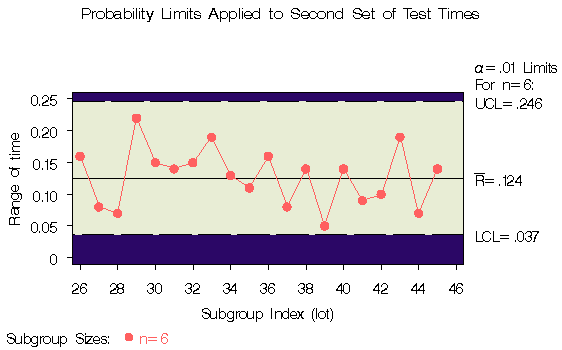
The following statements apply the limits in DLIMITS to the times in the data set DISKS2 (see "Reading Preestablished Control Limits" ):
   title 'Probability Limits Applied to Second Set of Test Times';
   symbol v=dot c=rose;
   proc shewhart data=disks2 limits=dlimits;
      rchart time*lot / readalpha
                        cframe   = vipb
                        cinfill  = ywh
                        cconnect = rose;
   run;
The READALPHA option* specifies that the variable _ALPHA_, rather than the variable _SIGMAS_, is to be read from the LIMITS= data set. Thus the limits displayed in the chart, shown in Output 39.1.3, are probability limits.
Output 39.1.3: Reading Probability Limits from a LIMITS= Data Set
|
|
Chapter Contents |
Previous |
Next |
 Top |
Copyright © 1999 by SAS Institute Inc., Cary, NC, USA. All rights reserved.