
Chapter Contents

Previous

Next
|
Chapter Contents |
Previous |
Next |
| Graphical Enhancements |
The third step is to create a trend chart with the SHEWHART
procedure, as follows:
   title 'Trend Chart for Diameter';
   symbol v=none c=salmon w=5;
   proc shewhart history=regdata;
      xchart diameter*hour /
         stddeviations
         trendvar = fitted
         cneedles = black
         wtrend   = 1
         split    = '/'
         nolegend
         cframe   = vibg
         cinfill  = ywh;
      label diameterx = 'Residual Mean/Fitted Mean';
   run;
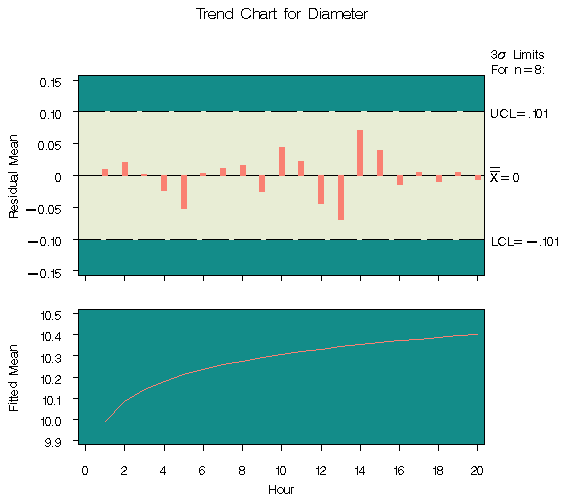
 chart
for the residual means (DIAMTERX - FITTED). The CNEEDLES=
option specifies that the residuals are to be represented
by vertical bars as deviations from the central line.
The chart in Figure 47.26 shows that,
after accounting for the trend, the mean level of the
process is in control.
chart
for the residual means (DIAMTERX - FITTED). The CNEEDLES=
option specifies that the residuals are to be represented
by vertical bars as deviations from the central line.
The chart in Figure 47.26 shows that,
after accounting for the trend, the mean level of the
process is in control.
|
If the data are correlated in time, you can use the ARIMA or AUTOREG procedures in place of the REG procedure to remove autocorrelation structure and display a control chart for the residuals; for an example, see "Autocorrelation in Process Data" . Another application of the TRENDVAR= option is the display of nominal values in control charts for short runs; see "Short Run Process Control" .
|
Chapter Contents |
Previous |
Next |
 Top |
Copyright © 1999 by SAS Institute Inc., Cary, NC, USA. All rights reserved.