
Chapter Contents

Previous

Next
|
Chapter Contents |
Previous |
Next |
| Tests for Special Causes |
| See SHWTSC5 in the SAS/QC Sample Library |
Occasionally, you may find it necessary to apply customized tests that cannot be specified with the TESTS= option. You can program your own tests as follows:
The following example illustrates these steps by creating
an  chart for the data in ASSEMBLY
(see
"Requesting Standard Tests" )
that signals a special cause of variation
if an average is greater than 2.5 standard errors
above the central line. The first step is to compute
chart for the data in ASSEMBLY
(see
"Requesting Standard Tests" )
that signals a special cause of variation
if an average is greater than 2.5 standard errors
above the central line. The first step is to compute  limits and save both the subgroup statistics and the limits
in an OUTTABLE= data set named FIRST.
limits and save both the subgroup statistics and the limits
in an OUTTABLE= data set named FIRST.
   proc shewhart history=assembly;
      xchart offset * sample /
         sigmas   = 2.5
         outtable = first
         nochart ;

   proc print data=first noobs;
   run;
A listing of the data set FIRST is shown in Figure 48.12.
The second step is to carry out the test and create the flag variable _TESTS_.
   data first;
      set first;
      length _tests_ $ 8;
      if _subx_ > _uclx_ then substr( _tests_, 1 ) = '1';
   run;
Finally, the data set FIRST is read by the SHEWHART procedure as a TABLE= data set.
   symbol v=dot c=salmon;
   title 'Customized Analysis of Assembly Data';
   proc shewhart table=first;
      xchart offset * sample / tests      = 1
                               testlabel1 = 'Test Signaled'
                               ctests     = black
                               cconnect   = salmon
                               cinfill    = ywh
                               cframe     = vligb;
      label _subx_ = 'Average Offset in cm';
   run;
The chart is shown in Figure 48.13. Note that the variable _TESTS_ is read "as is" to flag points on the chart, and the standard tests are not applied to the data. The option TESTS=1 specifies that a point is to be labeled if the first character of _TESTS_ for the corresponding subgroup is 1. The label is specified by the TESTLABEL1= option (the default would be Test1).
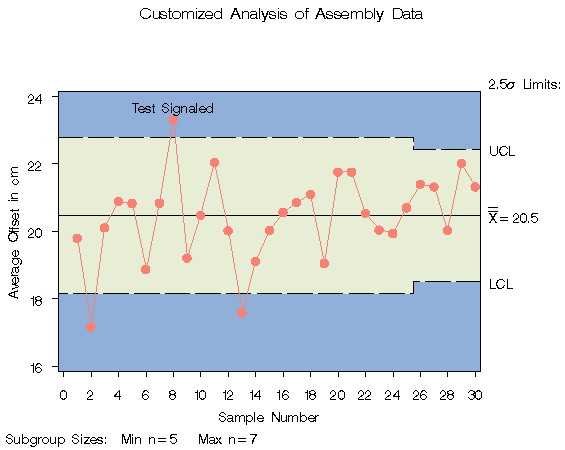
|
In general, you can simultaneously apply up to eight customized tests with the variable _TESTS_, which is of length 8. If two or more tests are signaled at a particular point, the label that is displayed corresponds to the test that appears first in the TESTS= list. In the preceding example, the test involves only the current subgroup. For customized tests involving patterns that span multiple subgroups, you will find it helpful to use the LAG functions described in SAS Language Reference: Dictionary.
Notes:
|
Chapter Contents |
Previous |
Next |
 Top |
Copyright © 1999 by SAS Institute Inc., Cary, NC, USA. All rights reserved.