Most
audio
instructors and textbook authors would not expect this topic
to be introduced so early in the Tutorial, nor would most of
them consider pairing these two seemingly unrelated topics.
Ring modulation is a special case of modulation
in general (as introduced in the Electromagnetic section of
the Sound-Medium Interface module in the context of radio
transmission). It is often associated with the early
electronic music studios of the 1950s and 60s, where custom
hardware multiplied two signals (and hence was sometimes
called product modulation), with a typically noisy,
broadband result. Today it is not commonly found in the
contemporary digital world of plug-ins.
Auto-convolution is a special case of the general topic of Convolution which will be
presented in more detail in a later module. Briefly,
auto-convolution multiplies the spectrum of a sound with
itself, based on a non-real-time calculation involving
analysis with the FFT (Fast Fourier Transform). The length of
the sound is doubled, the spectrum thinned out to emphasize
its strongest components, and aurally, the result is usually
very attractive.
So, why present these two topics here, and why pair them up?
Well, let’s think outside the box. The answer to the first
question is that they both affect the frequency domain,
but unlike the filters and equalizers of the previous module
which worked linearly, these two methods work non-linearly.
By linear and non-linear, we are not referring to the linear
vs logarithmic distinction, usually applied to frequency.
Instead, a linear process means the output is proportional
to the input in some way. In the case of filters and
equalizers, nothing in the output spectrum in terms of
frequency is different from the input, just the relative
strengths of the parts of the spectrum being altered. In a non-linear
process, the output contains elements that are not
proportional to the original spectrum. For instance, new
frequency components will be present (as in ring modulation),
or a non-proportional filtering of the amplitudes of various
frequencies will occur, as in auto-convolution. To understand
what those new components are, you need to understand some
theory, as presented below.
In addition, at least two other characteristics of these two
processes link them together. They both require two input
signals and produce one output signal. As a
result they do not follow the standard format of a plug-in
which is one input, one output. In any implementation of these
processes, a second input will be required, so where does it
come from? This problem has possibly limited their
availability in a DAW.
Lastly – and most importantly – Ring Modulation and
Convolution in general are mathematically linked, as
diagrammed here in terms of the time domain (the waveform) and
the frequency domain (the spectrum):
TIME DOMAIN
<––––––––––> FREQUENCY DOMAIN
Convolution <––––––––––––> Multiplication
Multiplication <–––––––––> Convolution
This means
that when you convolve (note the verb, it’s not
“convolute” which means something else that we are trying to
avoid!) two signals in the time domain you multiply them in
the frequency domain, meaning you multiply their spectra.
And when you multiply them in the time domain, you are
convolving their spectra, and it’s called Ring Modulation!
We will now build up the necessary background to understand
these two processes in the following sections.
A. Modulation
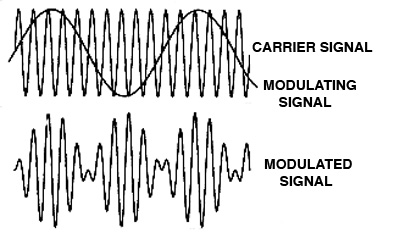
is a process whereby the modulator or program signal
controls a parameter of the other signal, called the carrier.
In other words, the instantaneous value of, for instance,
the amplitude or frequency of the carrier takes on the
pattern of the modulator. The modulator’s waveform
information is thereby encoded into the carrier. The
result is a modulated
carrier.
All forms of modulation at audio rates (i.e. greater
than 20 Hz) produce added spectral components in the output
signal called sidebands. When the modulation is subaudio
(i.e. less than 20 Hz) audible changes in the carrier’s
parameter can be discerned. In the acoustic world, tremolo
refers to a rapid alteration of amplitude, for instance with
a vibraphone, whereas vibrato
refers to a rapid alteration of frequency, and hence pitch,
in the voice or a string instrument, for instance. Sometimes
these processes get confused, or even overlap.
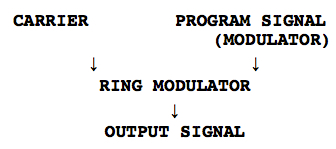
The basic circuit for all modulators, including ring
modulation can be diagrammed as having two inputs and one
output. As noted above, this puts the process in an awkward
position to be implemented as a plug-in. The only attempt
I’ve seen is where the modulator is a built-in sine wave
with a range of about 0 - 300 Hz, which is not very
generalized.
The three
types of modulation we are considering here result in
sidebands that can be predicted by a simple formula. Here we
assume that both input signals are sine waves, such as C
for the carrier and M for the modulator. The
sidebands then are also pure frequencies.
In the case of ring modulation, the two
signals are multiplied together, so there is no distinction
between carrier and modulator; therefore, we will refer to
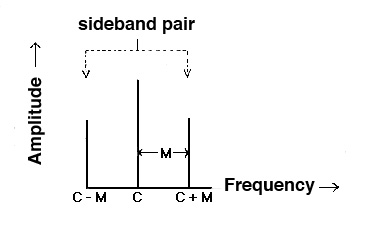
them as X and Y. Sidebands always occur in pairs
that can be called upper and lower sidebands
as they are equally spaced around the carrier (if it is
present). Here is the general pattern.
TYPE of
MODULATION
SPECTRUM
Amplitude
C, C + M, C - M
Ring
X + Y and X - Y
Frequency
/ C ± n.M / for n =
0, 1, 2, 3, .... where n is the sideband
pair number
Amplitude
Modulation (AM), where the carrier’s amplitude
is determined by the waveform of the modulator, is similar
to Ring Modulation (RM) in the sense that multiplication of
two signals in RM is also affecting the output amplitude of
the waveform. The difference between them is that the carrier
frequency is present in the output spectrum of AM, but
is absent from the output spectrum of RM.
As we will see below, that means that RM can act as a pitch
shifter since neither input signal is present in the output
spectrum. Frequency
modulation (FM) produces a more complex spectrum
based on a
theoretically infinite set of sideband pairs,
equally spaced around the carrier. This will be discussed in
more detail below.
In all cases of modulation, the modulating frequency is
never present in the output spectrum, but instead, it
controls the spacing of the sidebands, hence the
density of the spectrum. The depth
of modulation in AM reflects the amplitude of
the modulator, and is usually controlled by a gain factor.
The stronger the amplitude of the modulator, the stronger
the sidebands.
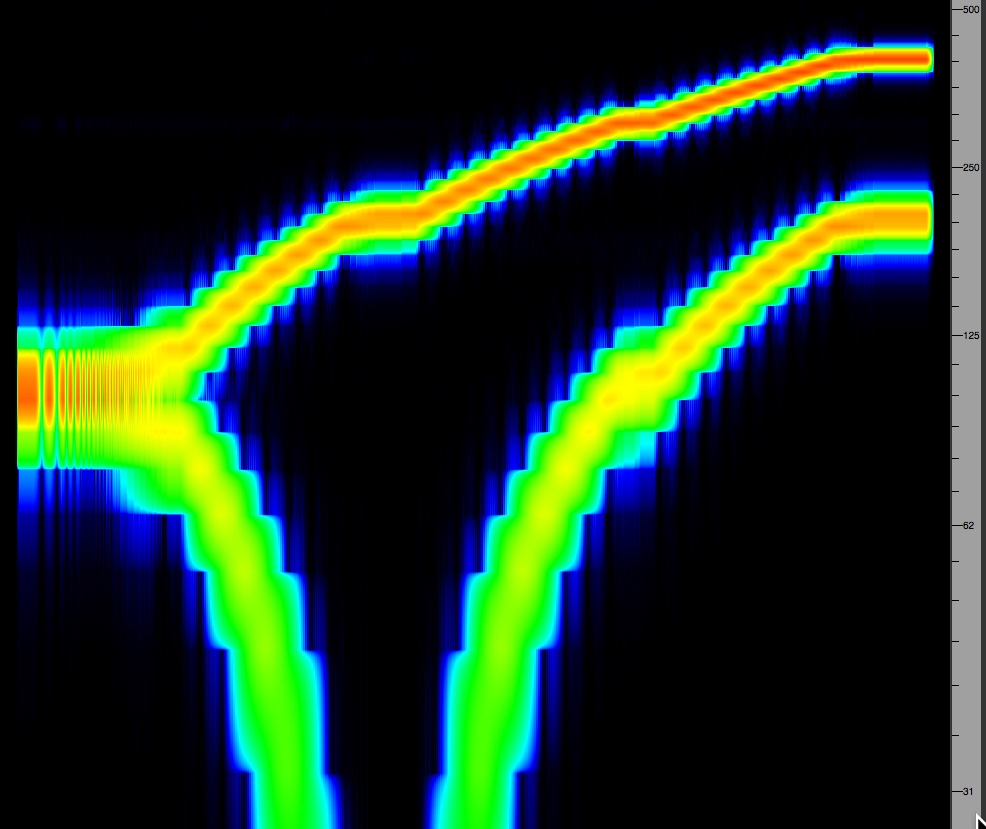
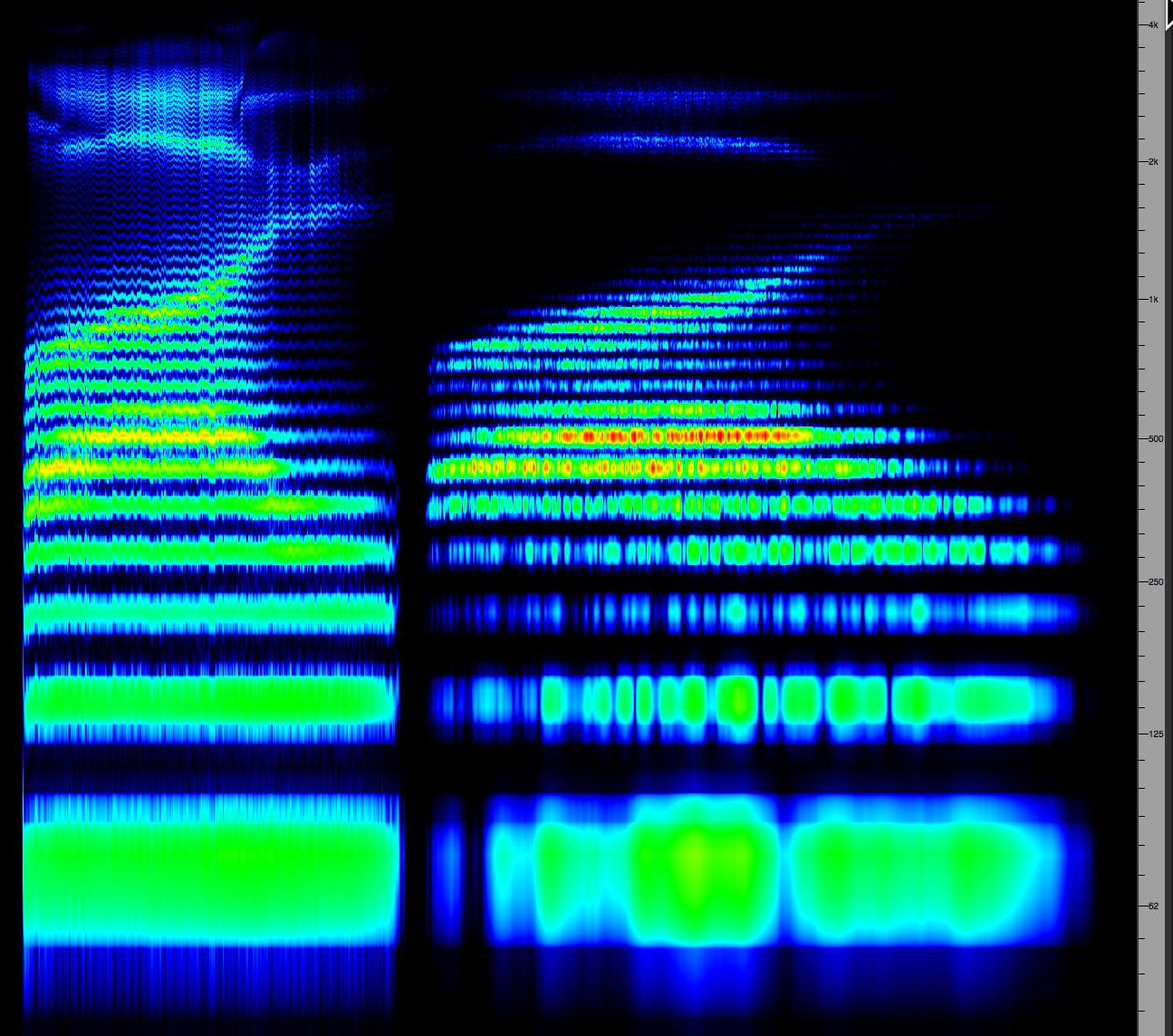
The following example
illustrates the typical type of spectrum produced by
Ring Modulation. There are only two sidebands, which
are the sum and difference (X + Y and X - Y) and
no carrier. In the example, we take a constant 100
Hz signal as X, which is multiplied by a signal Y that
sweeps upwards from 0. The sum and difference sidebands
create a typical pattern of the sum increasing and the
difference falling, eventually reaching zero when X and Y
are identical. At that point the sum is 2X, the octave
above. Beyond that the difference tone is reflected
back into the positive domain and starts ascending again.
Eventually both sum and difference tones lie high above
the original tone X.
Theoretically RM could be used for sound synthesis, but it
is not very general or flexible. For instance, there will
only be a harmonic relationship in the output if X and Y
are in a simple frequency ratio. All other cases will be
inharmonic and quite dissonant. Therefore in the next
section we look at RM as a non-linear signal processor.
Ring modulating 100 Hz with an ascending sine
wave starting at zero
B. Ring Modulation (RM) as
a Processor. Using sine tones to learn about RM is a
good idea because we can hear the effects quite clearly.
However, once we depart from the pure sine wave and start
using more complex tones, not to mention recorded samples,
the output becomes noisy very quickly because every
frequency in the spectrum gets doubled and hence the
result is very dense.
However, using a complex sound as one input and a sine
wave as the second input, which we’ll call the modulator,
the result is often quite useful. There are four general
types of effects, depending on the frequency range of the
modulator in relationship to the other sound.
MODULATOR
RANGE
EFFECT
subaudio
range (< 20 Hz)
AM style
beating (or chopping if a square wave is used)
same range
as carrier
added
spectral components
equal to
carrier
octave pitch
shift
much higher
than carrier
entire
signal shifted to high frequency
We’ll deal first with the “special case” of X and Y
(carrier and modulator) being identical. The sum
is 2X, the octave shift, and the difference is
zero, which is not a sound, but rather can be described as
a DC (Direct
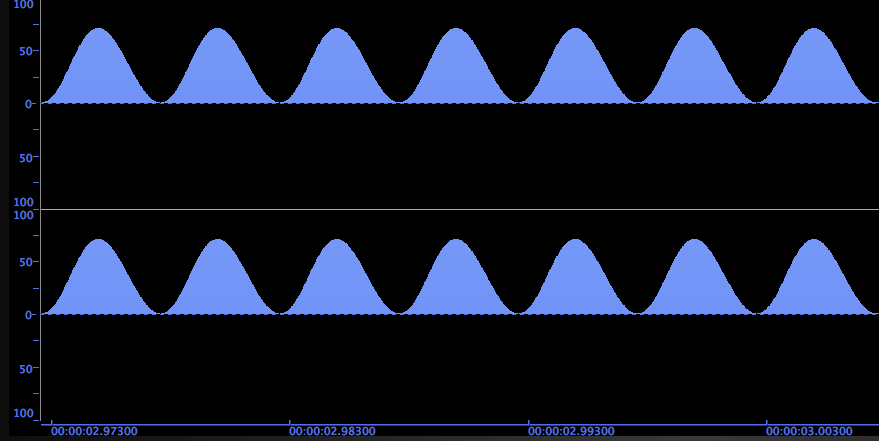
Current) component. An audio signal alternates
positive and negative, whereas DC is a constant voltage.
As you can see from the waveform diagrams below, that
raises a 100 Hz sine tone entirely into the positive
voltage domain and doubles the frequency. This effect is
also called a rectified
waveform, and the resulting DC component can become
undesirable in certain circumstances. In the case of the
sine wave, it just sounds thinner.
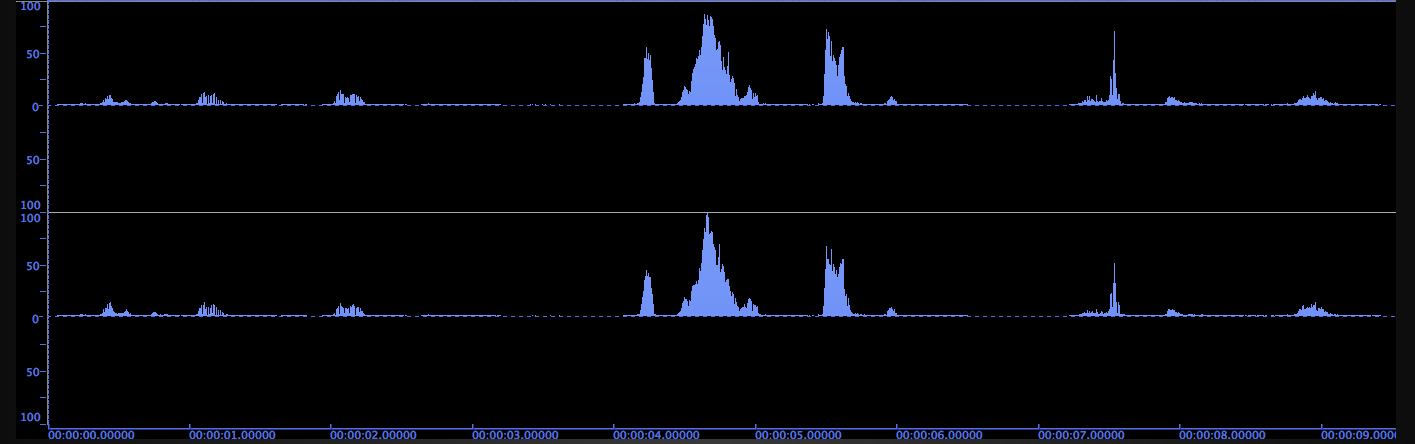
However, when we use a voice, for
instance, all of its frequencies are shifted up an octave
(including formant regions that are expected to remain
constant despite pitch shifts). However, it does not sound
like a doubling of pitch, the so-called "chipmunk effect",
because of phase differences that are introduced, plus the
DC component and the non-linear loudness change with the
louder phrases.
With the piano arpeggio, the normal pitch doubling raises
the sound by an octave as expected, but with a brighter
timbre. However, the self modulation example almost seems
to pitch the sound downward with a striking timbral
change. Since we’re talking about auto-convolution below,
this effect could be called auto-ring modulation, but so
far that term hasn’t appeared generally.
SOURCE
ORIGINAL
OCTAVE
TRANSPOSITION
RM with
itself
WAVEFORM
Click to enlarge
Sine Wave
Voice
(Christopher Gaze)
Piano
Arpeggio
Another special case is where there is
an octave relation between X and Y. The sum and
difference are 3X and X – the only case where the
original frequency appears in the output spectrum, but
only because the lower sideband matches it. This effect is
illustrated in the table below. The waveform is no longer
rectified and the original pitch is restored but with an
added 3rd harmonic.
Arguably the most useful range for RM is where you use a
sine tone in a similar range to your sound. The examples
show the effect with 100 Hz and 1 kHz modulators
modulating the voice and the piano arpeggio. The effect is
a classic non-linear spectrum shift in that a
constant frequency is being added and subtracted
from each spectral component, thickening the timbre and
adding dissonance (unless a carefully tuned relationship
with the modulator has been arranged, such as the octave
examples).
SOURCE
RM with
Octave
RM with
100 Hz
RM with 1
kHz
Voice
Piano
Arpeggio
Normal transpositions would use a constant ratio
(e.g. 2:1 or 3:2) because of the logarithmic nature of
hearing. Simply adding or subtracting a constant amount
will add many inharmonic partials not in the
original spectrum. GRM Tools has a Frequency Shift
module that is basically the upper sideband of RM, the sum
frequency, which is quite easy to control.
The one caveat to using a sine wave soundfile for this
process is that it has to be at least as long as the sound
you want to process. Since you’re multiplying the two
signals, if one goes to zero (i.e. ends), then nothing
comes out – anything multiplied by zero is zero.
The very high frequency modulator simply shifts
all frequencies to its high range. After all, 8 kHz plus
or minus some lower frequencies still keeps everything in
the high range. This “disappearance” of the input signal
is possibly yet another reason for the lack of popularity
of RM in conventional signal processing, where a purely
linear process will colour the input, but not make it
disappear! Back in the analog studio days, if someone
wanted a “space alien voice”, this is exactly what came to
mind - high frequency RM. How many sci-fi movies exploited
that one!
Voice with 8
kHz RM
The subaudio modulator goes back
to a straightforward multiplication of the carrier signal
with the slow pulse of whatever waveform is used. If it’s
a subaudio sine wave, then a gentle tremolo is
added, but if it’s a square wave, the result chops
up the signal with a kind of pulsating stutter.
SOURCE
RM with 6
Hz Sine Wave
RM with 6
Hz Square Wave
Voice
Piano
Arpeggio
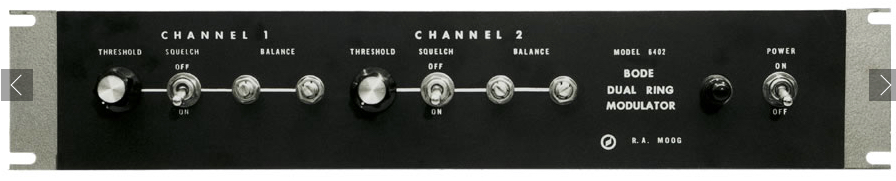
One of
the most famous Ring Modulators was designed by the
Norwegian engineer Harald Bode for Robert Moog. It had two
channels with two inputs each and a threshold level
control in order to minimize the “leakage” of the
input signal into the output. That is, any DC offset in
the audio signal going in (i.e. any departure from equal
positive and negative parts of the signal) would act like
a constant and also be multiplied by the modulator signal
which would cause it to be heard in the background.
Digital signals may be less likely to have this DC
component, but the same effect will be heard if they do.
Classic analog Ring Modulator designed by Harald Bode
for Robert Moog
One
speculation about the name “ring” modulation is that in a
typical circuit design for the process, four diodes were
arranged in a ring. However, because there is no feedback
involved, there is no “ringing” in the circuit. In
general, the analog nature of the signals being used and
the circuit itself resulted in a characteristically
“grungy” and noisy output sound that was not to everyone’s
liking. Most of those artifacts of the process are absent
in the purely digital examples heard here.
C. Auto-convolution.
Convolution as a general mathematical process has been
known and applied for some time, but only recently has it
become widely used because what used to be very lengthy
calculations using Direct Convolution have been
replaced by FFT (Fast Fourier Transform) analysis which
efficiently determines the amplitude components of each of
the analytical frequency bands being used.
Since convolving two sounds together means multiplying
their
spectra, once the amplitude values of each band have
been obtained, it is relatively simple to multiply them
together and use the Inverse FFT to return the signal to
the time domain. Today’s faster CPU rates have reduced
most calculations to a few seconds, but in general it is
better to start with shorter files.
Although the process is mathematical, it also represents
what happens with reverberation in a space, and therefore
it is based on a physical model of that process.
This is usually where a discussion and implementation of
the process starts, where it is often called Impulse
Reverb. This where you convolve a “dry” sound (i.e.
one recorded in an anechoic
chamber or other space with little reverberation) with the
Impulse Response (IR) of the desired space. An IR
is a broad-band sound that covers the entire frequency
range that is short enough to allow the reverberant decay
to be heard. An acoustician might use a starter pistol to
measure the IR, but for obvious reasons, we don’t advise
you to try this in a public space (!), so a handclap could
suffice, but better would be to break a balloon (with
permission of course).
The result is strikingly convincing through its realism
that your recorded sound appears to be located in the
reverberation space, at the same distance from the
listener as how the IR was recorded (source to
microphone). We will return to this kind of demonstration
in a later module.
Just as we know that all sound is “coloured” by the
acoustic space it is in (see the Sound-Environment
module), and a reverberant “tail” is added that lengthens
the duration, we will find those same properties in
auto-convolution.
The difference is that (1) we depart
from the physical model of reverberation, and in a sense,
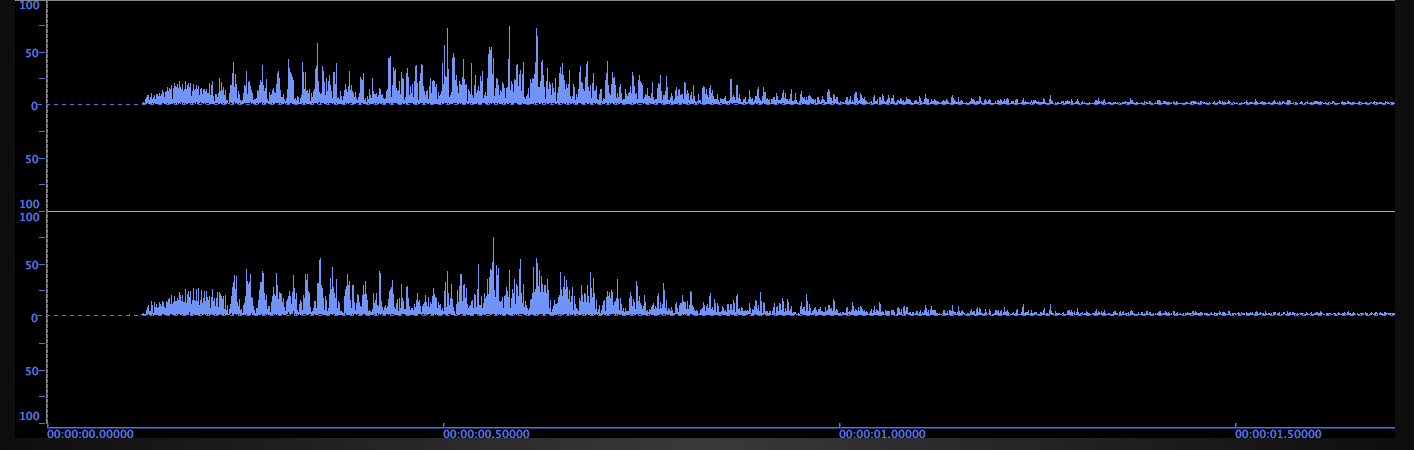
we process the sound with itself. Auto-convolution means multiplying
the spectrum by itself, such that strong
frequencies get much stronger, and weak ones much
weaker; (2) we double the duration of the sound,
because the rule with convolution is that the output
duration is the sum of the two input durations. We
expect this with a reverberant tail where a long reverb
time can add many seconds to the sound, so in that
sense, the doubling found in auto-convolution is not
surprising.
SOURCE
ORIGINAL
AUTO-CONVOLVED
SPECTRUM
Shakuhachi
(Randy Raine-Reusch)
note how the breathy aspects of
the sound have been muted
Bass
singer
(Derek Christian)
note how the harmonics in the
voice become more prominent
Click to enlarge
Before we proceed, some cautionary comments. Convolution
is not a combination of EQ and Reverb, which are
both linear processes. EQ alters the spectrum of a
sound, but that is not done dynamically as it would
happen in a real space which has its own complex
frequency response where some frequencies are damped and
others brightened, and the overall duration is extended.
In other words, timbre and space are intertwined
in convolution just as they are in the real world.
Auto-convolution (AC) then
has a non-linear effect on the spectrum. A
simple example is that if the ratio of the strongest
frequency in the spectrum to a very weak frequency is
10:1, then by multiplying it with itself, that ratio
becomes 100:1 in the output spectrum. That is why it was
referred to earlier as a “thinning” of the spectrum. Low
level noisy components are gone. But the price of this
is that very large numbers are involved in the
calculations.
Therefore, the process of normalization is
absolutely needed in the process, which means that
whatever large values occur in the multiplication of the
spectrum, the overall output signal gets reduced to the
dynamic range of the output. In digital audio (see the Sound-Medium interface
module on digital representation) a 24-bit (or
more) sample resolution is absolutely necessary to avoid
excess quantization at the lower amplitude
levels.
In fact, AC represents a “worst case scenario” for
convolution calculations. By definition the spectrum is
the same in the two signals being processed, because
they are the same sound. So therefore, the strongest
frequencies will get the maximum value in the output.
Even with normalization and the “floating point” method
of calculating large values, there still may be a
problem in dynamic range, so with very strong sounds,
it’s best to keep their maximum level at - 6dB or less
before using them in AC.
After hearing these stretched sounds,
it will be tempting to think that AC simply stretches
sounds. Of course it does, but things get more complex
when there are multiple sounds involved, such as speech
or a rhythmic sequence. Direct convolution, as mentioned
above, involves multiplying every sample with every
other sample in the file, and summing them - clearly
involving a lot of calculations. However, it gives a
clue as to what happens with multiple events. Every
individual sound is convolved with every other sound
in the sequence and summed.
For example, if there were ten sounds, the first would
be convolved with the first through to the 10th, then
the second sound would be treated the same, and finally
the last sound will be convolved with the first through
the last, and everything summed together. The pattern
then is the output starts and ends simply, but gradually
builds to the maximum density in the middle, before
thinning out again.
The density of the events in the output can be
controlled by using the Moving option which
refers to specifying a “Length Used” for the Impulse
signal. This length defaults to the entire length of the
Impulse, but a shorter specification, e.g. half, means
that the input sound will be processed with only the
first half of the Impulse, and then the second half,
thereby producing less density buildup. The shorter the
length used, the less the density. This option isn’t
very applicable for a sustained sound.
Vocal text auto-convolved (Christopher Gaze)
Finally, the AC process can be iterated multiple
times. For instance, the first iteration that doubles the
length can be the source for the same process, which doubles
the length again to four times, and continues to thin out
the spectrum to its principal components. Sometimes a third
iteration, stretching to 8 times, still produces an
interesting but very muted version. A set of examples that
have been used compositionally are available here.
So, to summarize: AC emphasizes the strongest
frequencies in a spectrum and doubles the length of the
sound. Particularly when the sound is already
reverberant, the image suggested by the convolved sound
might seem half way between the original sound and the
reverberant sound. A bit more imaginatively, an
auto-convolved sound might seem more like a memory of it,
more muted and evocative, but you’ll have to experience this
for yourself.
D. Frequency Modulation
Synthesis.Frequency
Modulation (FM) is a standard non-linear synthesis
method. As noted above, with a single sine-wave carrier and
modulator, it is capable of producing a wide range of
spectra where the sidebands are arranged in pairs around the
carrier. As with Ring Modulation, lower sidebands are reflected
into the positive domain when they go negative, and specific
frequency choices can result in both harmonic and inharmonic
spectra.
The chief advantage of the method, as originally formulated
by John Chowning at Stanford in the early 1970s, is that a
single parameter, the Modulation Index (I) controls
the bandwidth of the spectrum, instead of having to control
the envelopes of individual partials, as in Additive
Synthesis. This index is defined as the ratio between the amplitude
and frequency of the modulator, meaning that the
greater the amplitude of the modulator (its modulation
depth), the broader the bandwidth.
Putting an envelope onto the Modulation Index
produces a dynamic spectrum because the amplitude changes in
each sideband pair are non-synchronous, but go through
independent cycles of peaks and zeroes. Although this lacks
generality, it gives the aural impression of a dynamically
changing timbre similar to actual musical notes. However, it
can also simulate percussive instruments and produce purely
synthetic timbres.
The key to understand simple FM (one carrier and one
modulator) is the theory behind the ratio of the carrier to
the modulator, the c:m ratio. It can be studied in
this Tutorial.
Multiple carrier and multiple modulator instruments can also
be designed. One specific use of the multiple carrier, as
developed by Chowning, is to simulate vocal formants. By
tuning the various carrier frequencies to those associated
with vocal formants,
and using a small modulation index, a formant-like spectrum
can be created.
FM synthesis became widely available with the Yamaha DX7
keyboard synthesizer in the 1980s.
If you
would like to try some experiments with your soundfiles
similar to what is presented here, it’s unlikely that any
software you have will offer Ring Modulation or
Convolution. So, if not, download a free copy of SoundHack
from soundhack.com/freeware, the site maintained by Tom
Erbe of Cal Arts. He has several free packages (under
Freeware) of excellent Mac plug-ins, plus some that you
need to buy. But the original SoundHack, which is almost
30 years old now, is free and still available.
Note:
SoundHack will only work with .aif files (not .wav) on the
Mac, except for Ring Modulation.
Ring Modulation. The first thing
you’ll notice when you start SoundHack is that nothing seems
to happen! As you’ll see with the more recent modules, Tom is
perfectly capable of providing a very intelligent and user
friendly interface, but the original SoundHack is pretty
basic. You need to start by opening a file (command O) and
then you’ll see it loaded and can proceed to the Convolution
option (command C) under the Hack menu. Try it first
with the Ring Modulation option which, as explained above, is
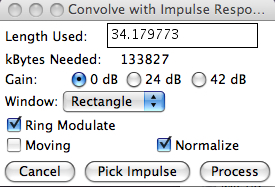
included in the Convolution option and looks like this once
you check the Ring Modulation box.
SoundHack Ring
Modulator
Of course, you’re going to need a second file called the Impulse
to modulate yours. If you have any sine wave files, you can
start with those as long as their duration is the same or
greater than the file you want to modulate. If you’re handy
with Max/Msp, you can record some simple oscillators, but if
not, here is a set of files you can download (right click or
control click) of some useful frequencies, and some sub-audio
ones. They are around 30” long.
I suggest starting with 100 Hz and 1 kHz as the Impulse,
similar to the above demo. There’s also 4 kHz and 8 kHz in
case you’d like to try the extreme transpositions they
produce. And for subaudio effects there’s a 6 Hz sine and
square.
As noted in the diagram, use the Rectangular window (which
means using complete chunks of your file) and always Normalize
the output (for maximum amplitude). Before you process the
sound, SoundHack will suggest a name for the output file,
but it’s probably better to simplify it to something like
BellX100Hz and then your choice of filename extension and
bit depth (16 bit will suffice). SoundHack supports all the
common formats.
You can listen to it in the small bar at the bottom by
hitting the spacebar. If you like it, then close the
output file that’s on the screen, look for it in your output
folder and import it into an editor for any cleanup that’s
needed. SoundHack tends to trim off any “zero signal” that
can occur when the impulse is longer than the other signal,
but not all programs will do that.
If you want to try another version, make sure you start by
clicking again on your input file – which is colourfully
coded on the screen – with command C in which case the word
“Input” will appear on it. Similarly you need to
specify the Impulse file again, and that word will
also appear on it. You can keep a lot of files open that you
may want to work with to modulate with each other. But,
again, in order to be able to edit the output file
in an editor, you have to close it in SoundHack in order to
avoid any confusion. But it can be opened again if it’s
needed for further work.
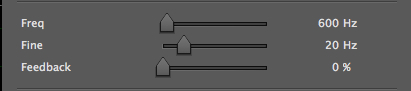
This is a simple (mda) Ring Modulator plug-in
that has a useful fine tuning slider for frequency that
ranges over 100 Hz only. The main sine wave frequency is
notched to 100 or 200 Hz steps, but sometimes is not very
accurate, such as the 100 Hz setting. A feedback level is
included that must be used carefully. However, it gives a
good range of effects and allows real-time testing which is
very valuable.
Personal Studio Experiment No. 4
Auto-Convolution. If
you haven’t done so already, you probably should
download the Convolution
Techniques pdf, as it is very detailed about all
of the parameters used by SoundHack, and has many tips
and bits of advice on how to use it.
The basic approach proceeds similarly to Ring
Modulation (command C in the Hack menu), but the RM box is
not checked. Again, you start by loading a file, or if it
is already on the screen, click on it to highlight it,
then type Command C for Convolution (or select it from the
Hack menu). Make sure the file now says “Input”. If not,
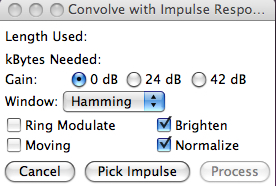
start again. This box will appear.
SoundHack
Convolution
For auto-convolution (convolving a sound with itself), you
need a duplicate file for the Impulse (the rule in
SoundHack is that the two input files must be different).
The easiest way to do that on a Mac is to highlight the
file in the Finder and type Command D. The duplicate file
will have the same name with “copy” added. The copy file
can later be deleted.
Select 0 dB to ensure the output the maximum dynamic
range, and Normalize as before. In this case, you can
select an analysis Window (e.g. Hamming). In the pdf
there’s more detail about what this means, but for
auto-convolution it shouldn’t make a difference. We will
return to this point when convolving two separate files.
The Brighten option is often useful, and is
probably unique to SoundHack. In acoustic spectra, it is
typical that they fall off at 6-9 dB per octave. However,
auto-convolution emphasizes the strongest frequencies, so
it is entirely possible that the highs will be quite dull
in the output if you don’t use Brighten which boosts the
high frequencies by 6 dB/octave.
On the other hand, if the sound is very strong in the
highs already, you don’t need to use it. Sometimes you
need to do the Convolution twice, once with and once
without Brighten just to see the effect (put something
like NB on the filename if it’s not brightened). Keep in
mind, you can always EQ the file later.
Then you select the Impulse file (the copy of the
original) and process. Again SoundHack will suggest a name
based on the two files, but it’s better to keep it simple
like Bell*self plus the extension. On the other
hand, it’s possible another program will object to the use
of the * character in the filename. Of course, that’s
ridiculous because it’s the correct mathematical symbol,
but software designers don’t like “special characters”
even when they’re accurate descriptors.
The most important thing to remember is that you must
use a 24 bit format for the output – this is
unfortunately not the default. So if you accidentally let
the 16-bit format be calculated, you’ll have to re-do the
process as you’ll get a lot of quantizing noise.
It’s best to use shorter sounds during your experimental
phase (10-20 sec), but with today’s processors, the
calculation are still quite speedy. You can always edit a
short bit out of a longer file to do some testing.
Convolution is always trial-and-error, so be patient. If
the calculation is long, you’ll see a whirling bullseye
indicating the processing is still going on.
Once the calculation is done, the output file will appear
on the screen in a new colour and you can play it by
hitting the spacebar, just to see if it seems to have
turned out alright. Even if the answer is yes, close it on
the screen, and open it in an editor. There will almost
always be things to check.
First of all, there may be extraneous silences at the
beginning and usually at the end; these may be excised,
particularly if you’re going to repeat the AC for another
iteration and doubling. Also check the levels of the left
and right channels. Since all amplitudes get exaggerated,
any small difference in the original L/R balance will be
exaggerated in the output. Select either the stronger
channel to reduce its level, or the weaker one to increase
it, and make sure you know how to do this on your editor.
If you’re planning on iterating the AC, this imbalance
will just get worse otherwise. Then save the revised file.
There is one known bug in SoundHack which
occasionally appears. In the normalization process, a
single sample can actually go over the maximum range
and come out as maximum negative, producing a nasty click.
There are two remedies: expand the file in your editor and
micro-edit out the incorrect sample (yes, some editors
make that easy to do, others not). Otherwise, go back and
try a different analysis window, e.g. Rectangular. Chances
are the error won’t occur this time. If there is a
“legitimate” amplitude overflow, not just one sample, go
back and reduce the amplitude of your input file by 6 dB.
If you’d like to auto-convolve the file again, make
another copy (Command D), and go back to SoundHack and
open the convolved file and repeat the process. This time
the Impulse will be the copy of the first convolved file.
Note that not all the menu settings will remain the same
as before, so check them over, particularly the bit rate.
If for some reason, you’re not happy with the process of
stretching by 2, 4, 8, etc., there are other options. If
we can refer to the original file as 1 and the
auto-convolved file as 2, then convolving them is 2+1=3
times longer. Similarly 4+2 equals 6 times longer and so
on. It’s tricky to keep this all straight, so good file
naming is essential. Index
F. Studio Demo:
Automating processing parameters.
In the previous module, we looked at the classic
analog parallel circuit where multiple synchronized
versions of a sound could be processed separately and
then mixed together. We tried to replicate this with a
ProTools session where we recorded (i.e. latched) the
playback levels to create a dynamic mix. Then we did
something similar in non-real-time, by assembling a
small mixing session where the individual tracks were
already processed and then mixed with amplitude
breakpoints. Both of these solutions can of course be
extended with files that are non-synchronous, but
perhaps still related.
During those demo’s we spoke about performability,
involving real-time processing that could be recorded
– something that was taken for granted in the analog
studio. We also noted that some plug-ins, such as GRM
Tools were specifically well designed to replicate
that kind of freedom because of the efficient
real-time controls, using presets and ramps that
interpolated between them, along with the x-y mouse
control for controlling two parameters at once.
But we also noted the common pitfall in plug-ins in
terms of whether dynamic processing created audible
artifacts such as clicks while parameters were
being adjusted. Two processes that are very difficult
to design without those artifacts are certain filter
settings, as in the previous module, and time delays,
as covered in the next one.
The advantage of being able to “perform” this kind of
processing in real-time is that, just as in the analog
studio, you can control the processing in response to
the sound itself and hence create a correlation
appropriate to its own character and gestures. This
can also be referred to as “hand-ear” correlation,
which when done intelligently often makes it seem like
the sound is changing of its own accord, as opposed to
being arbitrarily manipulated.
The choice is a matter of taste and intent, and could
work either way, but in general, the former approach
(integrating the processing with the sound), gives a
more organic feel to the result, and doesn’t draw the
listener’s attention to the manipulation. The latter
approach, being more arbitrary and uncorrelated, does
the opposite, which might still mean something to the
listener. Very few digital processes allow the
processing to be influenced by the behaviour of the
signal itself. The easiest correlation to make is with
an amplitude follower (or envelope follower)
where the signal’s amplitude can determine the
strength of a process, for instance.
The disadvantage of this form of digital
performability is that it doesn’t usually fit the
model of the DAW which is mainly designed for
assembling and controlling a mix in non-real-time,
then bouncing it to a finished soundfile. There are
some solutions to this problem, but most are not very
practical or available.
- a standalone app might include a direct-to-disk
option (such as MacPod that will be
introduced later); once the user starts a
recording and begins to manipulate the sound,
everything that happens to the sound will be
recorded. This facilitates improvisation, taking
risks – and later discarding anything not worth
saving.
- following analog practice, the “live”
performance with a plug-in can simply be recorded
– but where and how? Well if you have two
computers, there's no problem in connecting them;
likewise if you have two audio interfaces, a
digital patch out of one to the input of the other
can be arranged. Either of those situations today
is a luxury.
- if we’re willing to give up the freedom of total
improvisation to something more “rehearsed”, then
we can use the same resources that we saw
previously in the ProTools parallel circuit using
Auxiliaries and Inserts. Once the parameter(s)
involved in the process are specified for “automation”
on a specific track, we can see its values on a
separate line in Edit Mode, similar to Volume.
Then we can “latch” that parameter, perform
the dynamic change of the parameter during
playback, with the result being stored.
Afterwards, any subsection can be re-done with the
“touch” mode where stored values are
over-written by any manually triggered gestures.
Here’s a specific example, extending the parallel
Auxiliary patch from the previous module. To keep
things simple, we are going to change the cut-off
frequency in the left and right high-pass and
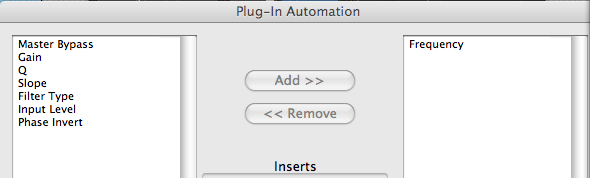
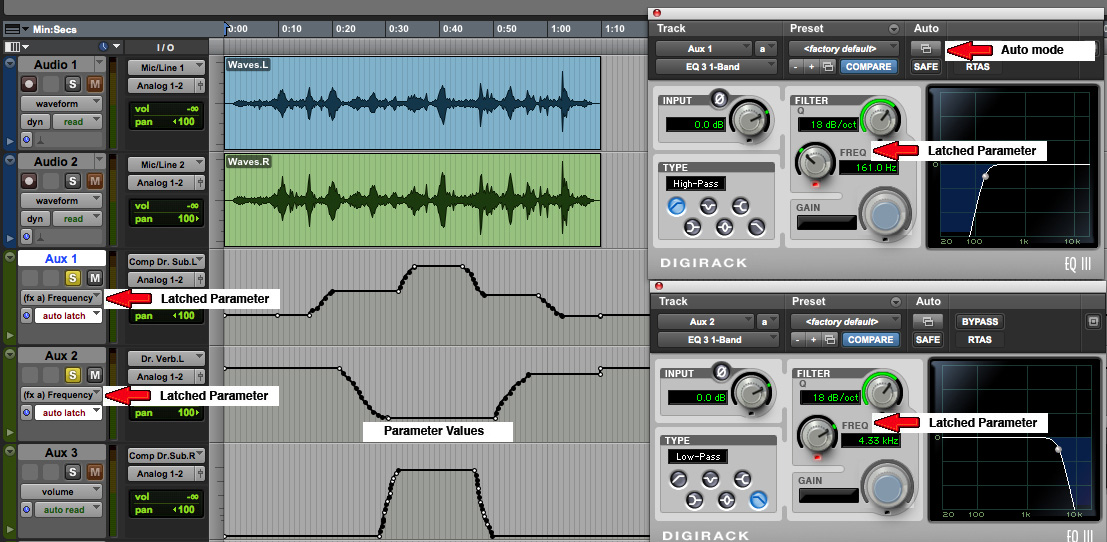
low-pass filters assigned to them. First we activate
the Automation button on the plug-in (shown
below as Auto mode), and select the parameter to be
controlled using the Add button, like this.
Then we set up the latching
mechanism as shown and do the recording. At this
point, we illustrate two choices for how to do this
with a mouse, similar to how mixing levels are
recorded – one track (or multiple ones grouped
together) at a time, or by real-time switching
between the levels of different tracks. Of course,
if you’re lucky enough to have a (physical) digital
mixer attached to the DAW, you don’t need to
compromise on this point.
(click to enlarge)
Dynamically filtered waves
(click to enlarge)
Dynamically filtered waves
In the left hand example, we alternately controlled
the left channel process and then the right channel
process via the mouse. This created a pseudo-stereo panning
effect which was accomplished with one pass. In the
right hand example, we recorded the left channel
control first, then re-cued the track to record the
right channel control (while listening to the left
channel by including it in the Solo monitor).
The aural result is that the quasi synchronization of
our performance of both cutoff frequencies gave the
impression of the changes happening to the entire
sound, not its L/R components. Note that, given the
nature of the controls going in opposite directions,
this pattern could not be achieved at the same time.
Is one version preferable to the other – you decide
for yourself!
Q. Try this review quiz to
test your comprehension of the above material, and
perhaps to clarify some distinctions you may have
missed. Note that a few of the questions may have
"best" and "second best" answers to explain these
distinctions.