Forecasting Project File Selection Window
Use the Forecasting Project File Selection window to locate and load
a previously stored forecasting project. Access it from
the project Browse button of the Manage Forecasting Project window or the
Time Series Forecasting Window or from the Open Project item under the
File pull-down of the Develop Models window.
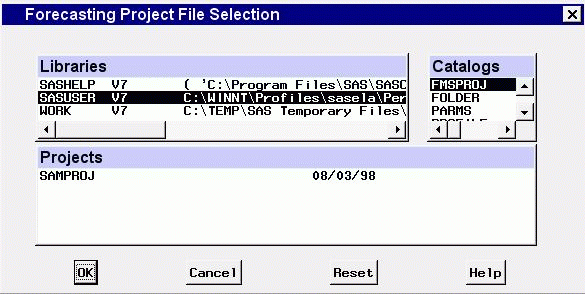
Selection Lists
- Libraries
-
is a list of currently assigned libraries. When you select a library from
this list, the catalogs in that library are shown in the catalog selection
list.
- Catalogs
-
is a list of catalogs contained in the currently selected library. When
you select a catalog from this list, any forecasting project entries stored
in that catalog are shown in the projects selection list.
- Projects
-
is a list of forecasting project entries contained in the currently selected
catalog.
Controls and Fields
- OK
-
closes the window and opens the selected project.
- Cancel
-
closes the window without selecting a project.
- Reset
-
restores selections to those which were set before the window was opened.
Copyright © 1999 by SAS Institute Inc., Cary, NC, USA. All rights reserved.