
Chapter Contents

Previous

Next
|
Chapter Contents |
Previous |
Next |
| Graphics Examples |
Suppose that you have data for ACME Corporation's stock price and you want a simple PRICE × DAY graph to see the overall trend of the stock's price. The data are as follows.
| Day | Price | |
| 0 | 43.75 | |
| 5 | 48.00 | |
| 10 | 59.75 | |
| 15 | 75.5 | |
| 20 | 59.75 | |
| 25 | 71.50 | |
| 30 | 70.575 | |
| 35 | 61.125 | |
| 40 | 79.50 | |
| 45 | 72.375 | |
| 50 | 67.00 | |
| 55 | 54.125 | |
| 60 | 58.750 | |
| 65 | 43.625 | |
| 70 | 47.125 | |
| 75 | 45.50 |
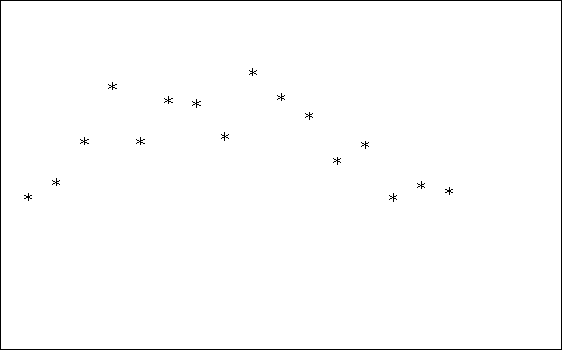
To graph a scatter plot of these points, enter the following statements. These statements generate Figure 12.1.
   proc iml;                            /* invoke IML        */
      call gstart;                      /* start graphics    */
      xbox={0 100 100 0};
      ybox={0 0 100 100};
      day=do(0,75,5);                   /* initialize day    */
      price={43.75,48,59.75,75.5,       /* initialize price  */
          59.75,71.5,70.575,
          61.125,79.5,72.375,67,
          54.125,58.75,43.625,
          47.125,45.50};
      call gopen;                       /* start new graph   */
      call gpoly(xbox,ybox);       /* draw a box around plot */
      call gpoint(day,price);           /* plot the points   */
      call gshow;                       /* display the graph */
|
Note that the GSTART statement initializes the graphics session. It usually needs to be called only once. Next, you enter the data matrices. Then you open a graphics segment (that is, begin a new graph) with the GOPEN command. The GPOINT command draws the scatter plot of points of DAY versus PRICE. The GSHOW command displays the graph.
Notice also that, for this example, the x coordinate
of the data is DAY and that 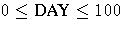 .The y coordinate is PRICE, which ranges
from
.The y coordinate is PRICE, which ranges
from 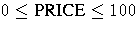 .
For this example, the ranges are this way because the IML
default ranges are from 0 to 100 on both the x and y axes.
Later on you learn how to change the default
ranges for the axes with the GWINDOW statement so
that you can handle data with any range of values.
.
For this example, the ranges are this way because the IML
default ranges are from 0 to 100 on both the x and y axes.
Later on you learn how to change the default
ranges for the axes with the GWINDOW statement so
that you can handle data with any range of values.
Of course, this graph is quite simple. By the end of this chapter, you will know how to add axes and titles, to scale axes, and to connect the points with lines.
|
Chapter Contents |
Previous |
Next |
 Top |
Copyright © 1999 by SAS Institute Inc., Cary, NC, USA. All rights reserved.