
Chapter Contents

Previous

Next
|
Chapter Contents |
Previous |
Next |
| The GANTT Procedure |
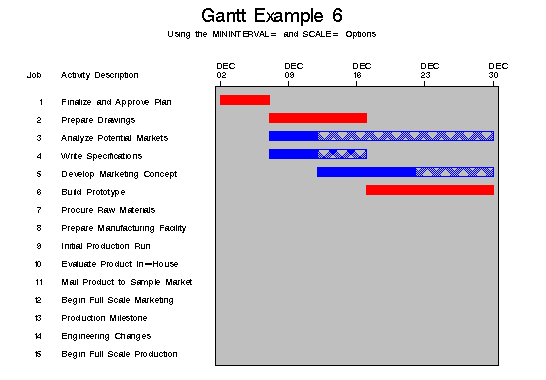
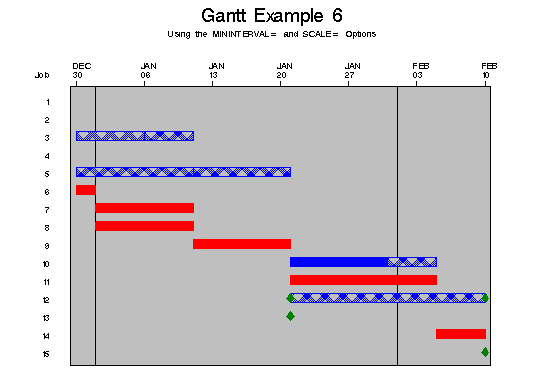
Because MININTERVAL=WEEK and SCALE=10, PROC GANTT uses (1000/h)% of the screen width to denote one week, where h is the value of HPOS. Note that this choice also causes the chart to become too wide to fit on one page. Thus, PROC GANTT splits the chart into two pages. The first page contains the ID variable as well as the job number while the second page contains only the job number. The chart is split so that the displayed area on each page is approximately equal. The first two PATTERN statements, used for the duration and slack time of noncritical activities, have been changed from the previous two examples. The duration of a noncritical activity is now indicated by a solid blue bar, and the slack time is indicated by a crosshatched blue bar. The SWISS font is used for all Gantt chart text by specifying the FONT= option in the CHART statement. The milestone color is changed to green using the CMILE= option. The resulting Gantt chart is shown in Output 4.6.2.
Output 4.6.1: Using the MININTERVAL= and SCALE= Options in Graphics Mode
   options ps=60 ls=100;

   title f=swiss 'Gantt Example 6';
   title2 f=swiss 'Using the MININTERVAL= and SCALE= Options';

   data widgaoa;
      input task $ 1-12 days tail head;
      datalines;
   Approve Plan   5   1   2
   Drawings      10   2   3
   Anal. Market   5   2   4
   Write Specs    5   2   3
   Prototype     15   3   5
   Mkt. Strat.   10   4   6
   Materials     10   5   7
   Facility      10   5   7
   Init. Prod.   10   7   8
   Evaluate      10   8   9
   Test Market   15   6   9
   Changes        5   9  10
   Production     0  10  11
   Marketing      0   6  12
   Dummy          0   8   6
   ;


   data details;
      input task $ 1-12 dept $ 15-27 descrpt $ 30-59;
      label dept = "Department"
            descrpt = "Activity Description";
      datalines;
   Approve Plan  Planning       Finalize and Approve Plan
   Drawings      Engineering    Prepare Drawings
   Anal. Market  Marketing      Analyze Potential Markets
   Write Specs   Engineering    Write Specifications
   Prototype     Engineering    Build Prototype
   Mkt. Strat.   Marketing      Develop Marketing Concept
   Materials     Manufacturing  Procure Raw Materials
   Facility      Manufacturing  Prepare Manufacturing Facility
   Init. Prod.   Manufacturing  Initial Production Run
   Evaluate      Testing        Evaluate Product In-House
   Test Market   Testing        Mail Product to Sample Market
   Changes       Engineering    Engineering Changes
   Production    Manufacturing  Begin Full Scale Production
   Marketing     Marketing      Begin Full Scale Marketing
   Dummy                        Production Milestone
   ;


   data widgeta;
      merge widgaoa details;
   run;


   * schedule the project;

   proc cpm data=widgeta date='2dec91'd out=save;
      tailnode tail;
      headnode head;
      duration days;
      id task dept descrpt;
   run;


   * sort the schedule by the early start date ;

   proc sort;
      by e_start;
   run;


   goptions vpos=42 hpos=80;

   * set up required pattern statements;

   pattern1 c=blue v=s;  /* duration of a noncrit. activity */
   pattern2 c=blue v=x5; /* slack time for a noncrit. act.  */
   pattern3 c=red  v=s;  /* duration of a critical activity */

   * plot the schedule;

   proc gantt;
      chart / mininterval=week scale=10
              dur=days cmile=green
              ref='1dec91'd to '1feb92'd by month
              font=swiss
              nolegend;
      id descrpt;
   run;
Output 4.6.2: Using the MININTERVAL= and SCALE= Options in Graphics Mode
|
|
|
Chapter Contents |
Previous |
Next |
 Top |
Copyright © 1999 by SAS Institute Inc., Cary, NC, USA. All rights reserved.