
Chapter Contents

Previous

Next
|
Chapter Contents |
Previous |
Next |
| The NETDRAW Procedure |
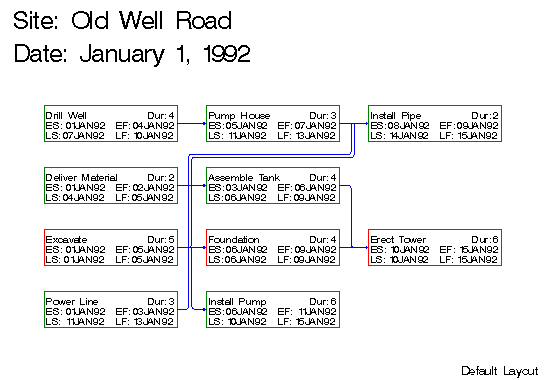
This example illustrates the use of the DP and HTRACKS= options to control the routing of the arcs connecting the nodes. The project is a simple construction project with the following data. A Schedule data set produced by PROC CPM is input to PROC NETDRAW. The first invocation of the procedure illustrates the default layout of the network. As explained in the "Layout of the Network" section, the NETDRAW procedure uses a simple heuristic to route the arcs between the nodes. In the resulting diagram displayed in Output 5.7.1, note that the specification of BOXHT=3 limits the number of rows within each node so that the float values are not displayed.
   data exmp1;
        input task     $ 1-16
              duration
              succesr1 $ 21-33
              succesr2 $ 35-46
              succesr3 $ 48-57;
   datalines;
   Drill Well       4  Pump House
   Pump House       3  Install Pipe
   Power Line       3  Install Pipe
   Excavate         5  Install Pipe  Install Pump Foundation
   Deliver Material 2  Assemble Tank
   Assemble Tank    4  Erect Tower
   Foundation       4  Erect Tower
   Install Pump     6
   Install Pipe     2
   Erect Tower      6
   ;

   proc cpm data=exmp1 date='1jan92'd out=sched;
      activity task;
      duration duration;
      successor succesr1 succesr2 succesr3;
      run;

   title j=l h=2 ' Site: Old Well Road';
   title2 j=l h=2 ' Date: January 1, 1992';
   footnote j=r 'Default Layout ';
   proc netdraw data=sched graphics;
      actnet / act = task
               dur = duration
               succ = (succesr1-succesr3)
               boxht = 3 xbetween = 10
               separatearcs
               htext=2
               pcompress;
         run;
Output 5.7.1: Arc Routing: Default Layout
|
   footnote j=r h=1 'Controlled Layout ';
   proc netdraw data=sched graphics;
      actnet / act = task
               dur = duration
               succ = (succesr1-succesr3)
               boxht = 3 xbetween = 10
               separatearcs
               htracks=1
               htext=2
               pcompress
               dp;
         run;
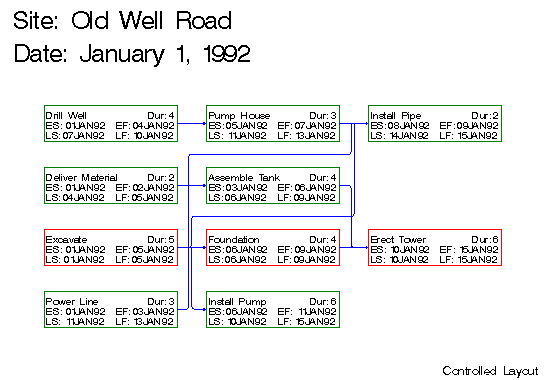
Output 5.7.2: Arc Routing: Controlled Layout
|
|
Chapter Contents |
Previous |
Next |
 Top |
Copyright © 1999 by SAS Institute Inc., Cary, NC, USA. All rights reserved.