
Chapter Contents

Previous

Next
|
Chapter Contents |
Previous |
Next |
| The NETDRAW Procedure |
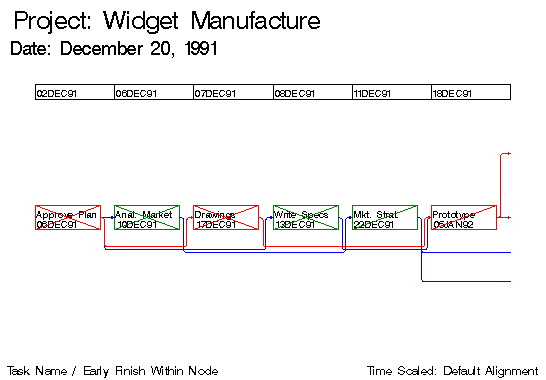
This example illustrates the use of the TIMESCALE and ALIGN= options to draw time-scaled network diagrams. The Schedule data set WIDGUPD, produced by PROC CPM in the last example, is used. First, PROC NETDRAW is invoked with the TIMESCALE option without any ALIGN= specification. By default, the procedure aligns the nodes to coincide with the early start times of the activities. The network spans two pages(HPAGES=2 VPAGES=1), as shown in Output 5.9.1. The HMARGIN= and VMARGIN= options add extra space around the margins.
   title  j=l f=swiss h=2 ' Project: Widget Manufacture';
   title2 j=l f=swiss h=1.5 ' Date: December 20, 1991';
   footnote j=l f=swiss ' Task Name / Early Finish Within Node'
            j=r f=swiss 'Time Scaled: Default Alignment ';
   proc netdraw data=widgupd graphics;
      actnet / act=task
               succ=(succ1 succ2 succ3)
               ybetween = 8
               separatearcs
               novcenter
               font=swiss
               id=(task e_finish)
               nodefid
               nolabel
               showstatus
               carcs=blue
               ccritarcs=red
               vmargin=5
               hmargin=5
               timescale
               htext=2 pcompress
               hpages=2 vpages=1
               nopagenumber;
      run;
Output 5.9.1: TIMESCALE Option: Default Alignment
|

|
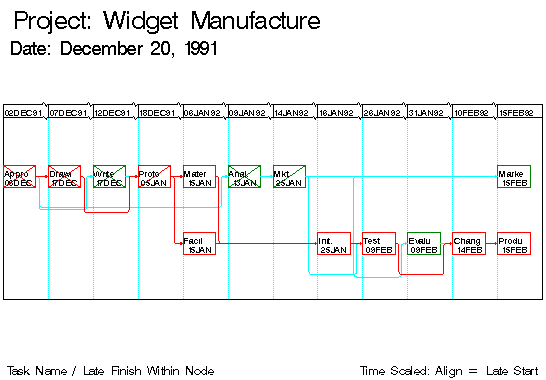
Next, PROC NETDRAW is invoked with several of the timescale options:
   footnote j=l f=swiss h=1.5 ' Task Name / Late Finish Within Node'
            j=r f=swiss 'Time Scaled: Align = Late Start ';
   proc netdraw data=widgupd graphics;
      actnet / act=task
               succ=(succ1 succ2 succ3)
               ybetween = 10
               separatearcs
               pcompress
               novcenter
               font=swiss
               id=(task l_finish)
               nodefid
               nolabel
               boxwidth=5
               showstatus
               carcs=cyan
               ccritarcs=red
               vmargin=10
               align=l_start
               frame
               autoref
               lref=33
               cref=cyan
               showbreak
               htext=2;
      run;
Output 5.9.2: Timescale Option: ALIGN= L_START
|
|
Chapter Contents |
Previous |
Next |
 Top |
Copyright © 1999 by SAS Institute Inc., Cary, NC, USA. All rights reserved.