
Chapter Contents

Previous

Next
|
Chapter Contents |
Previous |
Next |
| QQPLOT Statement |
| See CAPQQ1 in the SAS/QC Sample Library |
Measurements of the distance between two holes cut into 50 steel sheets are saved as values of the variable DISTANCE in the following data set:
   data sheets;
      input distance @@;
      label distance='Hole Distance in cm';
      datalines;
    9.80 10.20 10.27  9.70  9.76
   10.11 10.24 10.20 10.24  9.63
    9.99  9.78 10.10 10.21 10.00
    9.96  9.79 10.08  9.79 10.06
   10.10  9.95  9.84 10.11  9.93
   10.56 10.47  9.42 10.44 10.16
   10.11 10.36  9.94  9.77  9.36
    9.89  9.62 10.05  9.72  9.82
    9.99 10.16 10.58 10.70  9.54
   10.31 10.07 10.33  9.98 10.15
   ;
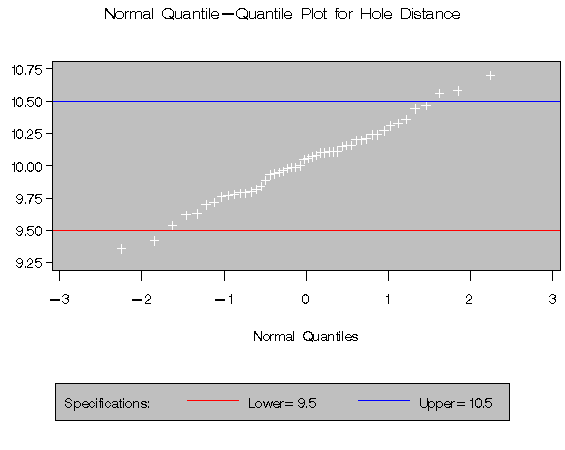
The cutting process is in control, and you decide to check whether the process distribution is normal. The following statements create a Q-Q plot for DISTANCE, shown in Figure 10.1, with lower and upper specification lines at 9.5 cm and 10.5 cm:*
   title 'Normal Quantile-Quantile Plot for Hole Distance';
   legend1 frame cframe=ligr cborder=black position=center;
   proc capability data=sheets noprint;
      spec lsl=9.5   clsl=red
           usl=10.5  cusl=blue;
      qqplot distance / cframe = ligr
                        legend = legend1;
   run;
The plot compares the ordered values of DISTANCE with quantiles of the normal distribution. The linearity of the point pattern indicates that the measurements are normally distributed. Note that a normal Q-Q plot is created by default. If you specify the LINEPRINTER option in the PROC CAPABILITY statement, the plot is created using a line printer, as shown in Figure 10.2. The specification lines are requested with the LSL= and USL= options in the SPEC statement.
|
|
Chapter Contents |
Previous |
Next |
 Top |
Copyright © 1999 by SAS Institute Inc., Cary, NC, USA. All rights reserved.