
Chapter Contents

Previous

Next
|
Chapter Contents |
Previous |
Next |
| Specialized Control Charts |
   data startup;
      input sample impure temp conc;
      label sample = 'Sample Number'
            impure = 'Impurities'
            temp   = 'Temperature'
            conc   = 'Concentration' ;
      datalines;
    1  14.92  85.77  42.26
    2  16.90  83.77  43.44
    3  17.38  84.46  42.74
    4  16.90  86.27  43.60
    5  16.92  85.23  43.18
    6  16.71  83.81  43.72
    7  17.07  86.08  43.33
    8  16.93  85.85  43.41
    9  16.71  85.73  43.28
   10  16.88  86.27  42.59
   11  16.73  83.46  44.00
   12  17.07  85.81  42.78
   13  17.60  85.92  43.11
   14  16.90  84.23  43.48
   ;
In preparation for the computation of the control limits,
the sample size is calculated and parameter variables are defined.
   proc means data=startup noprint ;
      var impure temp conc;
      output out=means n=n;

   data startup;
      if _n_ = 1 then set means;
      set startup;
      p        = 3;
      _subn_   = 1;
      _limitn_ = 1;
Next, the PRINCOMP procedure is used to compute the principal
components of the variables and save them
in an output data set named PRIN.
   proc princomp data=startup out=prin outstat=scores std cov;
      var impure temp conc;
   run;
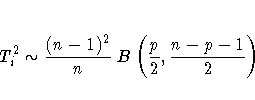
The following statements compute T2i and its exact
control limits, using the fact that T2i is the sum
of squares of the principal components.* Note that these statements create
several special SAS variables so that the data set PRIN
can subsequently be read as a TABLE= input data set by
the SHEWHART procedure. These special variables begin
and end with an underscore character.
The data set PRIN is listed in Figure 49.30.
   data prin (rename=(tsquare=_subx_));
      length _var_ $ 8 ;
      drop prin1 prin2 prin3 _type_ _freq_;
      set prin;
      comp1   = prin1*prin1;
      comp2   = prin2*prin2;
      comp3   = prin3*prin3;
      tsquare = comp1 + comp2 + comp3;
      _var_   = 'tsquare';
      _alpha_ = 0.05;
      _lclx_  = ((n-1)*(n-1)/n)*betainv(_alpha_/2, p/2, (n-p-1)/2);
      _mean_  = ((n-1)*(n-1)/n)*betainv(0.5, p/2, (n-p-1)/2);
      _uclx_  = ((n-1)*(n-1)/n)*betainv(1-_alpha_/2, p/2, (n-p-1)/2);
      label tsquare = 'T Squared'
            comp1   = 'Comp 1'
            comp2   = 'Comp 2'
            comp3   = 'Comp 3';
   run;
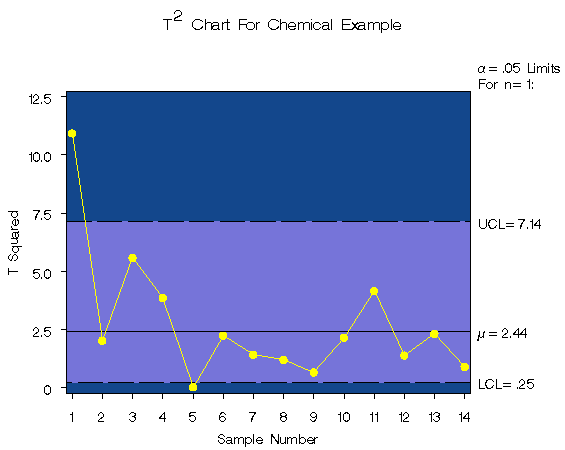
You can now use the data set PRIN as input to the SHEWHART procedure to create the multivariate control chart displayed in Figure 49.31.
   symbol v=dot c=yellow;
   title 'T' m=(+0,+0.5) '2'
             m=(+0,-0.5) ' Chart For Chemical Example';
   proc shewhart table=prin;
      xchart tsquare*sample /
         xsymbol  = mu
         cframe   = vigb
         cinfill  = vlib
         cconnect = yellow
         nolegend ;
   run;
|
The methods used in this example easily generalize
to other types of multivariate control charts.
You can create charts using the  and F
distributions by using the appropriate CINV or FINV
function in place of the
BETAINV function in the statements
.
For details, refer to Alt (1985), Jackson (1980, 1991), and Ryan (1989).
and F
distributions by using the appropriate CINV or FINV
function in place of the
BETAINV function in the statements
.
For details, refer to Alt (1985), Jackson (1980, 1991), and Ryan (1989).
|
Chapter Contents |
Previous |
Next |
 Top |
Copyright © 1999 by SAS Institute Inc., Cary, NC, USA. All rights reserved.