
Chapter Contents

Previous

Next
|
Chapter Contents |
Previous |
Next |
| The BOXPLOT Procedure |
   symbol v=dot c=salmon;
   goptions ftext=swiss;
   axis1 minor=none color=black label=(angle=90 rotate=0);
   title 'Box Plot for Power Output';

   proc boxplot data=turbine;
      plot kwatts*day / turnhlabel
                        cframe   = vligb
                        cboxes   = dagr
                        cboxfill = ywh
                        vaxis    = axis1;
   run;
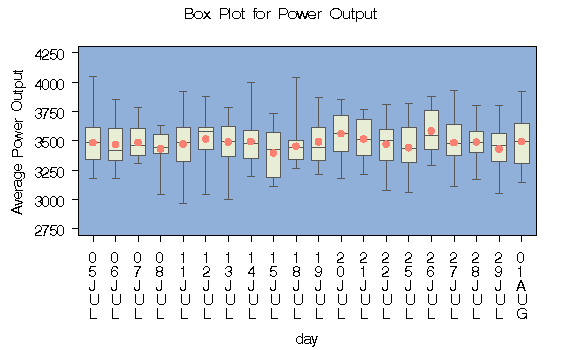
The labels on the horizontal axis in Figure 18.5 do not represent 20 consecutive days, but the box-and-whisker plots are evenly spaced (note that the TURNHLABEL option orients the horizontal axis labels vertically so there is room to display them all).
|
In order to treat the group variable as continuous, you can specify the CONTINUOUS or HAXIS= option. Either option produces a box plot with a horizontal axis scaled for continuous group variable values.
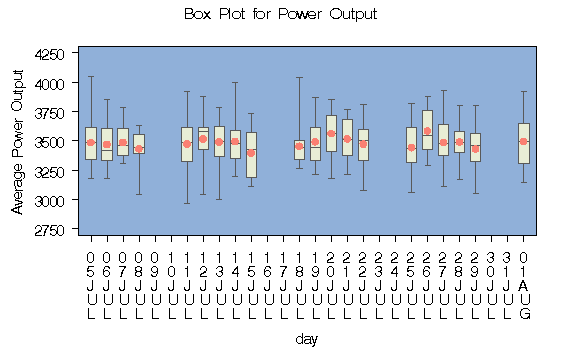
The following statements produce the plot shown in Figure 18.6. Note that the values on the horizontal axis represent consecutive days. Box-and-whisker plots are not produced for days when no turbine data was collected. The TOTPANELS= option is specified to display the entire box plot on one panel.
   symbol v=dot c=salmon;
   title 'Box Plot for Power Output';
   axis1 minor=none color=black label=(angle=90 rotate=0);

   proc boxplot data=turbine;
      plot kwatts*day / turnhlabel
                        cframe    = vligb
                        cboxes    = dagr
                        cboxfill  = ywh
                        totpanels = 1
                        vaxis     = axis1
                        continuous;

   run;
|
|
Chapter Contents |
Previous |
Next |
 Top |
Copyright © 1999 by SAS Institute Inc., Cary, NC, USA. All rights reserved.