Example 55.6: Controlling Plot Appearance with Graphics Options
This example uses model fit summary statistics from the OUTEST=
data set to create a plot
for a model selection analysis.
Global graphics statements and PLOT statement
options are used to control the appearance of the plot.
   goptions ctitle=black   htitle=3.5pct ftitle=swiss
            ctext =magenta htext =3.0pct ftext =swiss
            cback =ligr    border;
   symbol1 v=circle c=red h=1 w=2;
   title1 'Selection=Rsquare';
   title2 'plot Rsquare versus the number of parameters P in '
          'each model';

   proc reg data=fitness;
      model Oxygen=Age Weight RunTime RunPulse RestPulse MaxPulse
            / selection=rsquare noprint;
      plot rsq.*np.
           / aic bic edf gmsep jp np pc sbc sp
             haxis=2 to 7 by 1
             caxis=red cframe=white ctext=blue
             modellab='Full Model' modelht=2.4
             statht=2.4;
   run;
In the GOPTIONS statement,
-
- BORDER
- frames the entire display
- CBACK=
- specifies the background color
- CTEXT=
- selects the default color for the border and all text,
including titles, footnotes, and notes
- CTITLE=
- specifies the title, footnote, note, and border color
- HTEXT=
- specifies the height for all text in the display
- HTITLE=
- specifies the height for the first title line
- FTEXT=
- selects the default font for all text, including titles,
footnotes, notes, the model label and equation, the statistics, the
axis labels, the tick values, and the legend
- FTITLE=
- specifies the first title font
For more information on the GOPTIONS statement and other
global graphics statements,
refer to SAS/GRAPH Software: Reference.
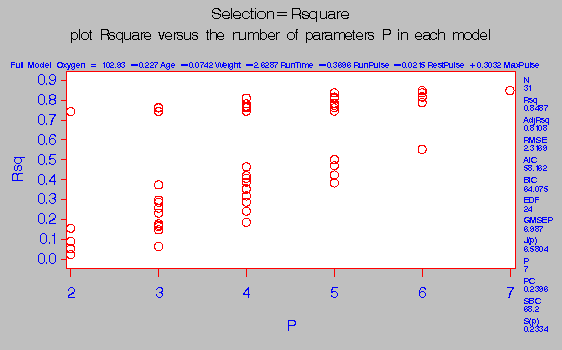
Output 55.6.1: Controlling Plot Appearance and Plotting OUTEST= Statistics
In Output 55.6.1, note the following:
- The PLOT statement option CTEXT= affects all text not controlled
by the CTITLE= option in the GOPTIONS statement. Hence, the GOPTIONS
statement option CTEXT=MAGENTA has no effect.
Therefore, the color of the title is black and all other text is blue.
- The area enclosed by the axes and the frame has a white
background, while the background outside the plot area is gray.
- The MODELHT= option allows the entire model equation to fit on
one line.
- The STATHT= option allows the statistics in the margin to
fit in one column.
- The displayed statistics and the fitted model equation refer to
the selected model. See the "High Resolution Graphics Plots" section for more information.
Copyright © 1999 by SAS Institute Inc., Cary, NC, USA. All rights reserved.