
Chapter Contents

Previous

Next
|
Chapter Contents |
Previous |
Next |
| The RSREG Procedure |
This example uses the three-factor quadratic model discussed in John (1971). Schneider and Stockett (1963) performed an experiment aimed at reducing the unpleasant odor of a chemical produced with several factors. The objective is to minimize the unpleasant odor of a chemical. The following statements read the data.
   title 'Response Surface with a Simple Optimum';
   data smell;
      input Odor T R H @@;
      label
         T = "Temperature"
         R = "Gas-Liquid Ratio"
         H = "Packing Height";
      datalines;
    66 40 .3 4     39 120 .3 4     43 40 .7 4     49 120 .7  4
    58 40 .5 2     17 120 .5 2     -5 40 .5 6    -40 120 .5  6
    65 80 .3 2      7  80 .7 2     43 80 .3 6    -22  80 .7  6
   -31 80 .5 4    -35  80 .5 4    -26 80 .5 4
   ;
The INPUT statement names the variables contained in the SAS data set smell; the variable Odor is the response, while the variables T, R, and H are the independent factors.
The following statements invoke PROC RSREG on the data set smell. Figure 56.1 through Figure 56.3 display the results of the analysis, including a lack-of-fit test requested with the LACKFIT option.
   proc rsreg data=smell;
      model Odor = T R H / lackfit;
   run;
Figure 56.1 displays the coding coefficients for the transformation of the independent variables to lie between -1 and 1, simple statistics for the response variable, hypothesis tests for linear, quadratic, and crossproduct terms, and the lack-of-fit test. The hypothesis tests can be used to gain a rough idea of importance of the effects; here the crossproduct terms are not significant. However, the lack-of-fit for the model is significant, so more complicated modeling or further experimentation with additional variables should be performed before firm statements are made concerning the underlying process.
|
|
Parameter estimates and the factor ANOVA are shown in Figure 56.2. Looking at the parameter estimates, you can see that the crossproduct terms are not significantly different from zero, as noted previously. The "Estimate" column contains estimates based on the raw data, and the "Parameter Estimate from Coded Data" column contains those based on the coded data. The factor ANOVA table displays tests for all four parameters corresponding to each factor -the parameters corresponding to the linear effect, the quadratic effect, and the effects of the cross products with each of the other two factors. The only factor with a significant over-all effect is R, indicating that the level of noise left unexplained by the model is still too high to estimate the effects of T and H accurately. This may be due to the lack of fit.
|
| ||||||||||||||||||||||||||||||||||||||||||||||||
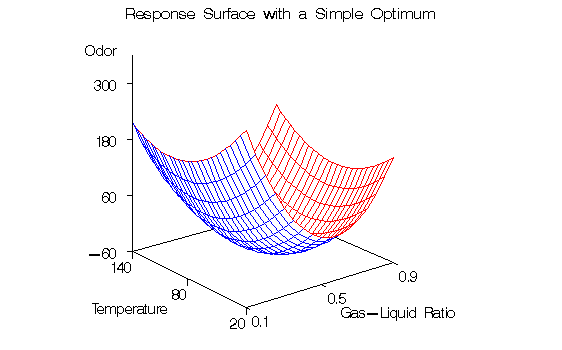
Figure 56.3 contains the canonical analysis and eigenvectors. The canonical analysis indicates that the directions of principle orientation for the predicted response surface are along the axes associated with the three factors, confirming the small interaction effect in the Regression ANOVA. The largest eigenvalue (48.8588) corresponds to the eigenvector {0.238091, 0.971116, -0.015690}, the largest component of which (0.971116) is associated with R; similarly, the second largest eigenvalue (31.1035) is associated with T. The third eigenvalue (6.0377), associated with H, is quite a bit smaller than the other two, indicating that the response surface is relatively insensitive to changes in this factor. The coded form of the canonical analysis indicates that the estimated response surface is at a minimum when T and R are both near the middle of their respective ranges and H is relatively high; in uncoded, terms, the model predicts that the unpleasant odor will be minimized when T = 84.876502, R = 9.539915, and H = 7.541050.
To plot the response surface with respect to two of the factor variables, first fix H, the least significant factor variable, at its estimated optimum value and generate a grid of points for T and R. To ensure that the grid data do not affect parameter estimates, the response variable (Odor) is set to missing. (See the "Missing Values" section.) The following statements produce and graph the necessary data. Initial data steps creates a grid over T and R, with H set to a constant value, and combine this grid with the original data. Then, PROC RSREG is used to create predictions for the combined data. Finally, PROC G3D is used to create a surface plot of the predictions.
   data grid;
      do;
         Odor =  .  ;
         H    = 7.541;
         do T = 20 to 140 by 5;
            do R = .1 to .9 by .05;
               output;
            end;
         end;
      end;
   data grid;
      set smell grid;
   run;

   proc rsreg data=grid out=predict noprint;
      model Odor = T R H / predict;
   run;

   data plot;
      set predict;
      if H = 7.541;
   proc g3d data=plot;
      plot T*R=Odor / rotate=38 tilt=75 xticknum=3 yticknum=3
      zmax=300 zmin=-60 ctop=red cbottom=blue caxis=black;
   run;
The first DATA step creates grid points for T and R at H=7.541 and sets Odor to missing, and the second DATA step concatenates these grid points with the original data. Predicted values are created in the SAS data set predict by invoking the RSREG procedure with the PREDICT option in the MODEL statement. The analysis is not displayed due to the NOPRINT option. The third DATA step subsets the predicted values over just the grid points (excluding the predictions at the original points). PROC G3D is then used to create the three-dimensional plot shown in Figure 56.4.
|
|
Chapter Contents |
Previous |
Next |
 Top |
Copyright © 1999 by SAS Institute Inc., Cary, NC, USA. All rights reserved.