

- About
- Apply
- Awards + Funding
- Graduate Students
- Life + Community
- Faculty + Staff
- Individualized Interdisciplinary Studies in Graduate Studies

Completing + Graduation
Degree Completion
Completion Options
Learn about the different completion options for SFU graduate programs, including theses, research projects, and capstones.
Review options and guidelines →
Master's Degree
Learn about thesis requirements →
Learn about defence requirements →
Doctoral Degree
Learn about thesis requirements →
Learn about defence requirements →
Early Completion Refund
If you complete your capstone within the first month of the term, you may be eligible for a reduced tuition rate.
Learn if you qualify →
Credential Confirmation
Learn how to generate your own Credential Completion letter until you are awarded your senate letter.
how to generate your own letter →
Convocation
Learn how to prepare for convocation, from applying to graduate, ordering regalia and ensuring your name appears correctly on your parchment.
Learn How to Prepare →
As you near the end of your program there will be steps you need to take to have your credential formally recognized and awarded.
Graduation Checklist
You're nearing degree completion and ready to graduate. Use this checklist to see what your next steps are on the road to convocation.
As you near the end of your program there will be steps you need to take to have your credential formally recognized and awarded.
When you are completing your capstone draft or final course it is recommended that you run your Academic Progress Report (APR). Your APR will show any outstanding program or university requirements. The only requirement that should show as “Not Satisfied” is your final capstone. If other requirements are displaying “Not Satisfied” contact your academic supervisor or graduate assistant as soon as possible. It may be that you have been granted an exception that has not been formally submitted or you may be missing a requirement.
During your final term you will need to apply to graduate. You do not have to wait until your defence or thesis has been submitted to the library to apply. Please refer to graduation application deadlines.
- Log into your student account at go.sfu.ca.
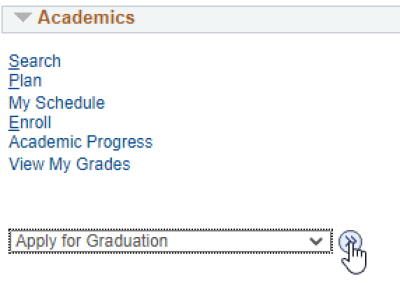
- Under the Academics heading, select the drop-down menu labelled 'other academic...', and select Apply for Graduation, then click the '>>' button, like the image on the right:
- Read the instructions, scroll down, and click the Save and Next buttons to fill out the online application form.
- If you are experiencing any issues with process, visit the SFU Convocation website.
What you'll see in your Student Centre:
Defend your thesis/research project
Submit to the library (if applicable)
Your submission must be submitted to the Library's Thesis Registration System on the day and time the of the submission deadlines listed on the Library's website. Be sure to review these deadlines in advance of scheduling your defence.
Updating your email address and mailing address
In order to be informed about the convocation and other important information, we recommend reviewing your contact information in goSFU to ensure its accuracy. If you move or change email addresses prior to your convocation ceremony, please update goSFU using the same steps.
- Log into goSFU
- Scroll to the buttom of your Student Centre to the 'Personal Information' section.
- Select 'Addresses' from the drop down and click the blue double arrow button.
Mailing Address
- Verify the mailing address is correct/included.
- If it no mailing address is included, click "Add a new Address", complete the information and click "Ok". Select the appropriate Address Type and "Save" once completed.
- If a mailing address is listed, but, is inaccurate, click the pencil icon. complete the information and click "Ok". Select the appropriate Address Type and "Save" once completed.
Alternative Email
- Verify the "other" email address is correct/included.
- Scroll through the navigation tabs under 'Personal Information’ and select "Email Addresses"
- If it no "other" email is included, click "Add an Email", select "other" from the drop-down menu and type your email in the text field and "Save" once completed.
- If an "other" email address is listed, but, is inaccurate, double click on the text box and type in your non-SFU email address and "Save" once completed.