Main MenuPreviousNext

Search Tab
Search the entire contents

  1. Select the Search tab.

    Search tab

  2. Check to see that SAS OnlineDoc appears next to the Search in button.

    Search in button

  3. If SAS OnlineDoc does not appear, click Search in. Then select SAS OnlineDoc from the Search window. Click OK to close the Search window.
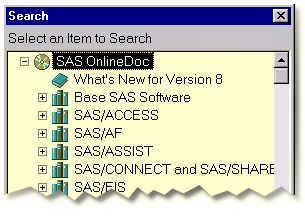

    Search window

  4. Enter the words you want to search for in the Words field.

    Words field

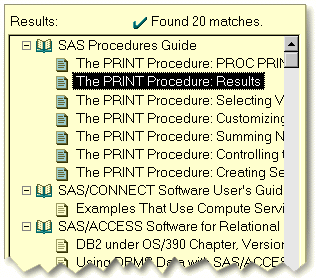
  5. Click Search or press the ENTER key. A list of items that match the search criteria appears on the left. The first item in the list appears on the right.

    Search button

  6. Select other items in the list to view them on the right. Items that most closely match the search are indicated with teal-colored icons.

    Sample search results

Search Tab
gray arrow
Search the entire contents                        


Main MenuPreviousNext

Copyright (c) 1999 SAS Institute Inc., Cary, NC, USA. All rights reserved.