
Chapter Contents

Previous

Next
|
Chapter Contents |
Previous |
Next |
| INSET and INSET2 Statements |
   data location;
      length _LABEL_ $ 10 _VALUE_ $ 12;
      input _LABEL_ _VALUE_ &;
   datalines;
   Plant     Santa Clara
   Line      1
   Shift     2
   ;
   title 'Mean Chart for Diameters';
   proc shewhart data=wafers;
      xchart diamtr*batch /
         lsl      = 34.97
         usl      = 35.03
         cframe   = bibg
         cinfill  = ligr
         cconnect = red;
      inset data = location lsl='LSL' usl='USL' cp (6.4) stddev (6.4) /
         cfill    = ywh
         position = rm
         cshadow  = black
         header   = 'Summary Statistics';
run;
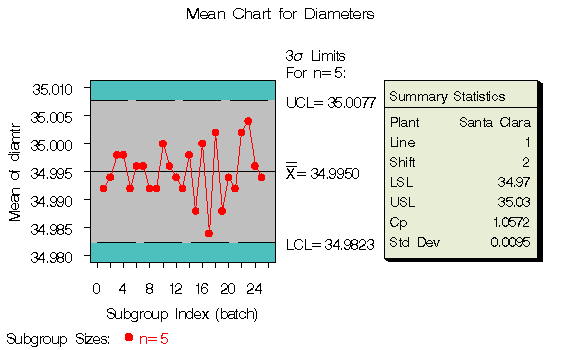
The header (in this case, Summary Statistics) can be up to 40 characters. Note that a relatively long list of inset statistics is requested. Consequently, POSITION=RM is specified to position the inset in the right margin. For more information about positioning, see "Details". The CSHADOW= option is used to display a drop shadow on this inset. The options, such as HEADER=, POSITION= and CSHADOW= are specified after the slash (/) in the INSET statement. For more details on INSET statement options, see "Dictionary of Options".
Note that the contents of the data set LOCATION appear before other statistics in the inset. The position of the DATA= keyword in the keyword list determines the position of the data set's contents in the inset.
|
|
Chapter Contents |
Previous |
Next |
 Top |
Copyright © 1999 by SAS Institute Inc., Cary, NC, USA. All rights reserved.