
Chapter Contents

Previous

Next
|
Chapter Contents |
Previous |
Next |
| INSET and INSET2 Statements |
 and R charts,
each with its own inset.
The unwanted decimal places are eliminated and the default
specification limits labels are replaced with abbreviations:
and R charts,
each with its own inset.
The unwanted decimal places are eliminated and the default
specification limits labels are replaced with abbreviations:
   proc shewhart data=wafers;
      xrchart diamtr*batch /
         lsl      = 34.97
         usl      = 35.03
         cframe   = bibg
         cinfill  = ligr
         cconnect = red;
      inset lsl='LSL' usl='USL' / cill   = ywh
                                  pos    = nw
                                  height = 3;
      inset2 cp (6.4) stddev (6.4) / cfill  = ywh
                                     pos    = nw
                                     height = 3;
   run;
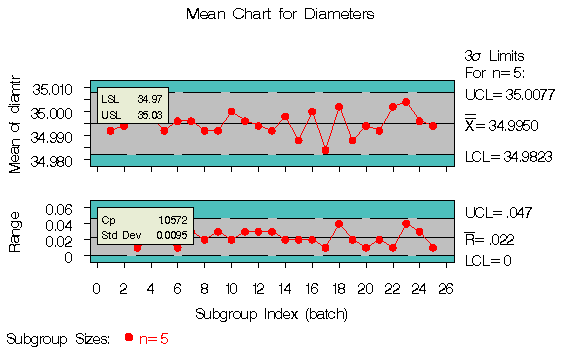
The resulting and R charts are displayed in Figure 45.2.
You can provide your own label
by specifying the keyword for that
statistic followed by an equal sign (=) and the
label in quotes. The label can have up to 24
characters.
The format 6.4 specified in parentheses after the CP and STDDEV keywords displays those statistics with a field width of six and four decimal places. In general, you can specify any numeric SAS format in parentheses after an inset keyword. You can also specify a format to be used for all the statistics in the INSET statement with the FORMAT= option. For more information about SAS formats, refer to Chapter 14 of SAS Language Reference: Dictionary.
Note that if you specify both a label and a format for a statistic, the label must appear before the format.
|
|
Chapter Contents |
Previous |
Next |
 Top |
Copyright © 1999 by SAS Institute Inc., Cary, NC, USA. All rights reserved.