
Chapter Contents

Previous

Next
|
Chapter Contents |
Previous |
Next |
| The LOESS Procedure |
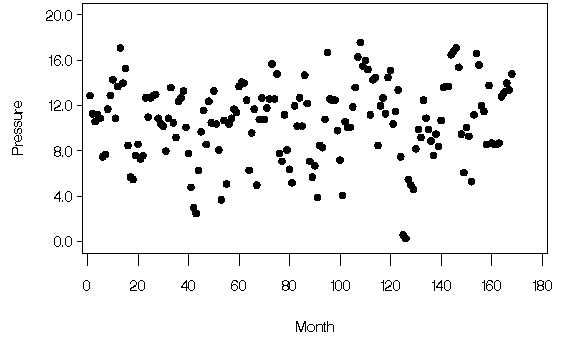
The following data set contains measurements of monthly averaged atmospheric pressure differences between Easter Island and Darwin, Australia for a period of 168 months (NIST 1998).
   data ENSO;
     input Pressure @@;
     Month=_N_;
     format Pressure 4.1;
     format Month 3.0;
   datalines;
   12.9  11.3  10.6  11.2  10.9   7.5   7.7  11.7
   12.9  14.3  10.9  13.7  17.1  14.0  15.3   8.5
    5.7   5.5   7.6   8.6   7.3   7.6  12.7  11.0
   12.7  12.9  13.0  10.9  10.4  10.2   8.0  10.9
   13.6  10.5   9.2  12.4  12.7  13.3  10.1   7.8
    4.8   3.0   2.5   6.3   9.7  11.6   8.6  12.4
   10.5  13.3  10.4   8.1   3.7  10.7   5.1  10.4
   10.9  11.7  11.4  13.7  14.1  14.0  12.5   6.3
    9.6  11.7   5.0  10.8  12.7  10.8  11.8  12.6
   15.7  12.6  14.8   7.8   7.1  11.2   8.1   6.4
    5.2  12.0  10.2  12.7  10.2  14.7  12.2   7.1
    5.7   6.7   3.9   8.5   8.3  10.8  16.7  12.6
   12.5  12.5   9.8   7.2   4.1  10.6  10.1  10.1
   11.9  13.6  16.3  17.6  15.5  16.0  15.2  11.2
   14.3  14.5   8.5  12.0  12.7  11.3  14.5  15.1
   10.4  11.5  13.4   7.5   0.6   0.3   5.5   5.0
    4.6   8.2   9.9   9.2  12.5  10.9   9.9   8.9
    7.6   9.5   8.4  10.7  13.6  13.7  13.7  16.5
   16.8  17.1  15.4   9.5   6.1  10.1   9.3   5.3
   11.2  16.6  15.6  12.0  11.5   8.6  13.8   8.7
    8.6   8.6   8.7  12.8  13.2  14.0  13.4  14.8
   ;
The following PROC GPLOT statements produce the simple scatter plot of these data, displayed in Output 38.4.1.
   symbol1 color=black value=dot ;
   proc gplot data=ENSO;
      plot Pressure*Month /
           hminor = 0
           vminor = 0
           vaxis  = axis1
           frame;
           axis1 label = ( r=0 a=90 ) order=(0 to 20  by 4);;
   run;
Output 38.4.1: Scatter Plot of ENSO Data
|
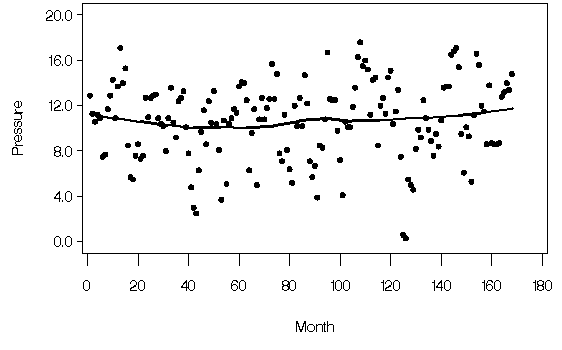
You can compute a loess fit and plot the results for these data using the following statements:
   ods output OutputStatistics=ENSOstats;

   proc loess data=ENSO;
      model Pressure=Month ;
   run;

   symbol1 color=black value=dot h=2.5 pct;
   symbol2 color=black interpol=join value=none width=2;
   proc gplot data=ENSOstats;
      plot (depvar pred)*Month / overlay
           hminor = 0
           vminor = 0
           vaxis  = axis1
           frame;
           axis1 label = ( r=0 a=90 ) order=(0 to 20  by 4);
   run; quit;
Output 38.4.2: Oversmoothed Loess Fit for the ENSO Data
|
Alternatively, a variety of automatic methods for choosing the smoothing parameter exist. Many of these methods choose a smoothing parameter that minimizes a criterion that incorporates both the tightness of the fit and model complexity of the form

where  is the average residual sum of squares and
 is a penalty function designed to decrease with
increasing smoothness of the fit.
Here L is the smoothing matrix of the method. This matrix satisfies
is a penalty function designed to decrease with
increasing smoothness of the fit.
Here L is the smoothing matrix of the method. This matrix satisfies

 is the
corresponding vector of predicted values of the dependent variable.
Examples of specific criteria obtained with this methodology
are generalized cross validation (Craven and Wahba 1979),
the Akaike information criterion (Akaike 1973), and the bias
corrected Akaike information criteria (Hurvich and Simonoff 1998).
is the
corresponding vector of predicted values of the dependent variable.
Examples of specific criteria obtained with this methodology
are generalized cross validation (Craven and Wahba 1979),
the Akaike information criterion (Akaike 1973), and the bias
corrected Akaike information criteria (Hurvich and Simonoff 1998).
Hurvich and Simonoff (1998) show that the bias corrected Akaike information criteria avoid the tendency to undersmooth that often occurs when using the classical Akaike information criterion or generalized cross validation. One such criterion is given by


The statistics that you use to compute AICC1 are also used to perform statistical inference in loess models. You can find these numbers in the "Fit Summary" table of PROC LOESS, provided that you specify at least one of the options ALL, CLM, DFMETHOD=EXACT, STD, and T in the MODEL statement. As with all tables of output, you can capture the "Fit Summary" table numbers in a SAS data set by using an ODS output. The following SAS macro takes such an output data set as an argument. It finds the smoothing parameter that yields the smallest AICC1 statistic for all the smoothing parameters that you specify in the MODEL statement.
   %macro SmoothSelect(data);
   options nonotes;
   ods listing close;

   data temp;
      set &data(keep = Label1 nValue1 smoothingParameter
         where=(Label1 in
               ('Number of Observations',
                'Residual Sum of Squares',
                'Trace[L]'
                'Equivalent Number of Parameters',
                'Delta1',
                'Delta2',
                'Lookup Degrees of Freedom')));
   run;

   proc transpose data=temp(drop=Label1) out=temp;
      by smoothingParameter;
   run;

   data temp(drop=_NAME_); set temp;
      rename Col1 = n
             Col2 = rss
             Col3 = traceL
             Col4 = delta1
             Col5 = delta2
             Col6 = nu1
             Col7 = lkdf;

   data SmoothCriteria(keep = SmoothingParameter aicc1);
      set temp;
      sigmaHat=rss/n;
      aicc1=n*(log(sigmaHat) + (delta1/delta2)*(n+nu1)/(lkdf-2) );

   proc sort data=SmoothCriteria(where=(aicc1^=.))
                  out=Aicc1Results;
      by aicc1;
   run;

   ods listing;
   proc print data=Aicc1Results(obs=1);
      title2 'Smoothing Parameter Minimizing the AICC1 Statistic';
      id SmoothingParameter;
   run;

   proc sort data=Aicc1Results;
     by SmoothingParameter;
   run;
   title1 'AICC1 Criterion';
   symbol1 c=black i=join value=none width=2;
   proc gplot data=SmoothCriteria;
      plot aicc1*SmoothingParameter/
         hminor = 0
         vminor = 0
         vaxis  = axis1
         frame;
         axis1 label = ( r=0 a=90 );
   run; quit;

   title1;
   %mend;
You can use this macro as follows:
   proc loess data=ENSO;
      ods output fitsummary=ENSOsummary;
      model Pressure=Month /
          smooth = 0.03 to 0.1 by 0.01
          dfmethod=exact;
   run;

   %SmoothSelect(EnsoSummary);
You use the DFMETHOD=EXACT option in the MODEL statement to produce the statistics needed to compute the AICC1 criterion. You use the SMOOTH= option to specify the list of smoothing parameters you want to examine. You use the ODS OUTPUT statement to capture the "Fit Summary" tables for these smoothing parameters in the data set that you use as the argument for the SMOOTHSELECT macro.
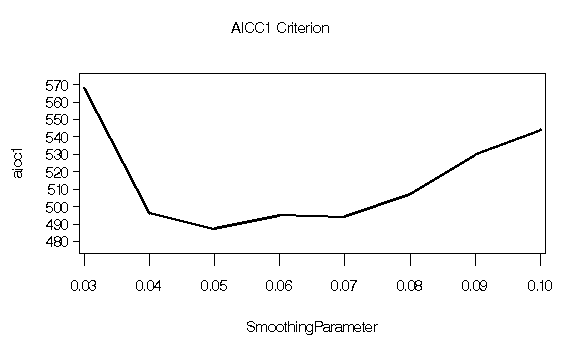
You obtain the plot shown in Output 38.4.3 and the output shown in Output 38.4.4.
Output 38.4.3: AICC1 Statistic for the ENSO data
|
|
   ods output OutputStatistics=ENSOstats;

   proc loess data=ENSO;
      model Pressure=Month/ smooth =0.05;
   run;

   symbol1 color=black value=dot h=2.5 pct;
   symbol2 color=black interpol=join value=none width=2;
   proc gplot data=ENSOstats;
      plot (depvar pred)*Month / overlay
           hminor = 0
           vminor = 0
           vaxis  = axis1
           frame;
           axis1 label = ( r=0 a=90 ) order=(0 to 20  by 4);
   run; quit;
   run;
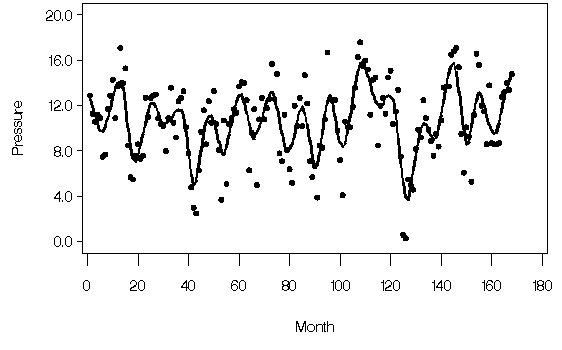
Output 38.4.5: Loess Fit with Smoothing Parameter 0.05
|
|
Chapter Contents |
Previous |
Next |
 Top |
Copyright © 1999 by SAS Institute Inc., Cary, NC, USA. All rights reserved.